





Best Alternatives to Data Roaming
You do not have to rely on expensive carrier roaming every time you travel abroad. Depending on your destination, trip length, phone compatibility, and budget, there are several better ways to stay connected.
The most common alternatives are travel eSIMs, local SIM cards, international day passes, and Wi-Fi.
1. Travel eSIM: Best for Most International Travelers
A travel eSIM is a digital SIM that lets you install a prepaid data plan on your phone without using a physical SIM card.
Instead of paying roaming fees to your home carrier, you buy a data plan for your destination before or during your trip. After installation, you can use mobile data abroad through the eSIM plan.
A travel eSIM is useful because:
- You can install it before departure.
- You do not need to find a SIM card shop after landing.
- You can keep your home SIM active for calls or texts.
- You can choose a prepaid data package upfront.
- Many eSIM plans support multiple countries or regions.
- There is no physical SIM card to swap or lose.
For most travelers, this is the easiest way to avoid traditional roaming charges while still using mobile data abroad.
However, your phone must support eSIM, and some eSIM plans may require data roaming to be enabled on the eSIM line.
2. Local SIM Card: Good for Longer Single-Country Trips
A local SIM card can be a budget-friendly option if you are staying in one country for a longer period.
You buy a SIM card from a local mobile provider, insert it into your phone, and use a local data plan. In many destinations, local SIM cards offer affordable data and strong domestic coverage.
A local SIM may work well if:
- You are staying in one country for several weeks.
- You need a local phone number.
- Your phone has an unlocked physical SIM slot.
- You do not mind buying and setting up the SIM after arrival.
The downside is convenience. You may need to find a SIM shop, show your passport, compare plans, queue at the airport, or deal with language barriers. You may also need to remove your home SIM if your phone has only one physical SIM slot.
3. International Day Pass: Convenient but Can Add Up
Some mobile carriers offer international day passes. These allow you to use your regular plan abroad for a fixed daily fee.
This option can be convenient because you keep your normal phone number, billing, and carrier setup. It may work well for short business trips or emergency use.
However, day passes can become expensive on longer vacations. A daily fee that feels acceptable for one or two days may become costly over a 10-day or 14-day trip.
Before choosing this option, check:
- The daily fee
- Included destinations
- Data allowance or speed limits
- Whether charges start automatically when data is used
- Whether your trip length makes the total cost too high
4. Public Wi-Fi: Free but Less Reliable
Public Wi-Fi can help reduce mobile data usage, especially at hotels, airports, cafés, and shopping malls.
It is useful for:
- Checking messages
- Downloading maps
- Uploading photos
- Making calls through messaging apps
- Watching videos at your hotel
However, Wi-Fi is not always available when you need it most. It may be slow, unstable, or unsafe on public networks. You also cannot rely on Wi-Fi when using maps on the street, booking rides, translating menus, or handling urgent travel changes.
If you use public Wi-Fi, avoid logging into sensitive accounts unless the network is trusted. A VPN can add another layer of protection, especially on open public networks.
Data Roaming Alternatives: Quick Comparison
| Option | Best For | Main Benefit | Main Drawback |
|---|---|---|---|
| Travel eSIM | Most international travelers | Prepaid, fast setup, no SIM swap | Requires eSIM-compatible phone |
| Local SIM Card | Longer single-country trips | Often cheap local data | Setup after arrival, may need passport |
| International Day Pass | Short trips or business travel | Easy to use with your home carrier | Daily fees can add up |
| Public Wi-Fi | Light use at hotels, airports, cafés | Free access | Limited coverage and security risks |
Which Option Should You Choose?
Choose a travel eSIM if you want the easiest prepaid option for mobile data abroad.
Choose a local SIM card if you are staying in one country for a longer time and want a local number.
Choose an international day pass if your trip is very short and you prefer using your home carrier.
Use public Wi-Fi as a backup, but do not depend on it as your only connection while traveling.
For most modern travelers, a prepaid travel eSIM offers the best balance of convenience, cost control, and flexibility.
Looking for a simple roaming alternative? Gohub offers prepaid travel eSIM plans for 190+ destinations, so you can install your data plan before departure and connect when you arrive.
Smart Data Usage Tips While Traveling
Even if you use a travel eSIM, local SIM card, or international roaming plan, it is still smart to control your mobile data usage while traveling.
Many apps use data in the background without you noticing. By adjusting a few settings before your trip, you can reduce unnecessary data use and make your travel data plan last longer.
1. Download Offline Maps Before You Go
Maps can use a lot of mobile data, especially when you are moving around a new city all day.
Before your trip, download offline maps for:
- Your arrival airport
- Your hotel area
- Main tourist districts
- Train stations or bus terminals
- Day trip destinations
Google Maps and Apple Maps both allow offline map downloads in many locations. This helps you navigate even when your mobile signal is weak or when you want to save data.
2. Save Important Travel Documents Offline
Do not rely on mobile data every time you need to open a booking confirmation or travel document.
Save offline copies of:
- Boarding passes
- Hotel reservations
- Train or bus tickets
- Travel insurance documents
- Visa or entry documents
- Tour booking confirmations
- Emergency contact details
You can save them in your phone files, notes app, wallet app, or screenshots folder.
3. Turn Off Background Data for Non-Essential Apps
Some apps keep syncing even when you are not actively using them. This can quickly consume data while traveling.
Before departure, consider limiting background data for:
- Cloud photo backups
- App store updates
- Video apps
- Music streaming apps
- Social media apps
- Email apps with large attachments
On iPhone, you can turn off Background App Refresh for selected apps.
On Android, you can restrict Background Data or enable Data Saver mode.
4. Disable Auto-Play and Auto-Download
Social media and messaging apps can use a surprising amount of data through auto-play videos and automatic media downloads.
Before traveling, adjust settings in apps like:
- TikTok
- Telegram
- Messenger
- YouTube
Turn off auto-play videos and disable automatic downloads for photos, videos, and large files when using mobile data.
5. Use Wi-Fi for Heavy Data Tasks
Use hotel or trusted Wi-Fi for activities that consume a lot of data, such as:
- Uploading photos and videos
- Backing up files to the cloud
- Downloading Netflix or YouTube content
- Updating apps
- Joining long video calls
- Syncing large work files
This helps preserve your mobile data for important travel tasks like maps, messaging, ride-hailing, and translation.
6. Track Your Data Usage During the Trip
Check your mobile data usage regularly, especially on the first day of your trip.
This helps you understand how fast you are using data and whether you need to adjust your habits.
You can track usage through:
- iPhone Cellular or Mobile Data settings
- Android Data Usage settings
- Your carrier app
- Your eSIM provider app, if available
If your plan has limited data, try checking usage once a day during your trip.
Data Roaming vs International Plans vs Travel eSIMs
Not all roaming options work the same way. Some travelers use standard data roaming from their home carrier, while others buy an international day pass, a roaming package, a local SIM card, or a travel eSIM.
The main difference is how you pay and how much control you have before the trip.
1. Standard Data Roaming
Standard data roaming means your phone connects to a foreign partner network through your home carrier.
This is convenient because you do not need to install anything new. However, it can be expensive if your mobile plan does not include international data.
Standard roaming is best used for emergencies or very light use, unless your plan clearly includes affordable roaming in your destination.
2. International Day Passes
An international day pass lets you use your home carrier’s service abroad for a fixed daily fee.
This is usually easier to understand than pay-per-use roaming. You keep your normal phone number and use your existing carrier setup.
However, daily fees can become expensive on longer trips. A day pass may be reasonable for a short business trip, but less cost-effective for a one-week or two-week vacation.
3. Roaming Packages
Some carriers offer travel data packages for specific countries, regions, or time periods.
These packages may include a fixed data allowance, such as a few gigabytes for 7, 14, or 30 days. They can be more predictable than standard roaming, but prices and coverage vary widely by carrier and destination.
Before buying a roaming package, check:
- Which countries are included
- How much data you get
- Whether speeds are reduced after a limit
- Whether calls and texts are included
- What happens when the package runs out
4. Travel eSIMs
A travel eSIM is different from traditional carrier roaming because it is usually prepaid.
You choose a destination or regional data plan, install the eSIM digitally, and use that plan for mobile data abroad. This gives you more control over cost before you travel.
A travel eSIM is especially useful if you want to:
- Avoid open-ended roaming charges
- Install your data plan before departure
- Keep your home SIM active for calls or texts
- Travel across multiple countries
- Avoid buying a physical SIM card after landing
Some travel eSIMs require data roaming to be turned on for the eSIM line. This does not mean your home carrier will charge you, as long as your mobile data is assigned to the travel eSIM and not your home SIM.
Quick Comparison: Roaming Options for Travelers
| Option | Payment Style | Ease of Setup | Cost Control | Best For |
|---|---|---|---|---|
| Standard data roaming | Charged by home carrier | Very easy | Low | Emergency use |
| International day pass | Daily fixed fee | Easy | Medium | Short trips |
| Roaming package | Prepaid or add-on | Medium | Medium | Carrier-loyal travelers |
| Travel eSIM | Prepaid data plan | Easy | High | Most international travelers |
Which Roaming Option Is Best?
If you only need data for a short emergency, standard roaming may be enough.
If you are taking a short business trip and want maximum convenience, an international day pass may work.
If you prefer staying with your home carrier, a roaming package may be worth checking.
But if you want clearer upfront pricing, simple setup, and better control over mobile data abroad, a prepaid travel eSIM is usually the better option for most travelers.
The Future of Travel Connectivity
Travel connectivity is moving toward more flexible, prepaid, and digital options. As more phones support eSIM, travelers can install data plans before departure, switch between mobile profiles, and avoid relying only on traditional carrier roaming.
5G roaming may improve speeds in major cities, while satellite internet may become useful for remote destinations in the future. However, for most international travelers today, a prepaid travel eSIM remains one of the simplest ways to control cost and stay connected abroad.
Before every trip, check your roaming settings, review your carrier’s international fees, and choose a data option that matches your destination, trip length, and usage needs.
FAQs About Data Roaming
1. What is data roaming?
Data roaming means your phone uses mobile data on another carrier’s network when you are outside your home network. This usually happens when you travel internationally and your phone connects to a foreign mobile network.
2. Should data roaming be on or off when traveling?
Data roaming should usually be off when traveling abroad unless you have an international roaming plan or a travel eSIM that requires roaming to be enabled. If you are unsure about your carrier’s roaming charges, keep it off to avoid unexpected fees.
3. What happens if data roaming is on?
If data roaming is on, your phone may connect to a foreign mobile network and use mobile data abroad. This allows apps, maps, email, and browsers to work, but it may create extra charges if your plan does not include international roaming.
4. Is data roaming the same as mobile data?
No. Mobile data is the general internet connection your phone uses through a cellular network. Data roaming happens when your phone uses mobile data outside your home carrier’s network, usually through a partner network abroad.
5. Does data roaming use more data?
Data roaming does not automatically use more data than normal mobile data. However, roaming can feel more expensive because the cost per megabyte, daily fee, or international package price may be higher than your regular domestic data plan.
6. Can I use Wi-Fi if data roaming is off?
Yes. Turning off data roaming only stops your phone from using mobile data on foreign networks. You can still connect to Wi-Fi at hotels, airports, cafés, restaurants, and other public places.
7. Do I need data roaming on for an eSIM?
Sometimes. Some travel eSIMs require data roaming to be turned on so the eSIM can connect to its supported local network. This does not mean your home carrier will charge you, as long as your mobile data line is set to the travel eSIM and not your home SIM.
8. How do I avoid roaming charges abroad?
To avoid roaming charges, turn off data roaming on your home SIM, use Wi-Fi when possible, download offline maps before your trip, and consider using a prepaid travel eSIM or local SIM card for mobile data abroad.
9. Is a travel eSIM better than data roaming?
For many travelers, a travel eSIM is better than traditional roaming because it is usually prepaid and easier to control. You can choose a data plan before your trip instead of relying on open-ended roaming charges from your home carrier.
10. Should I remove my home SIM when using a travel eSIM?
Usually, you do not need to remove your home SIM. On many phones, you can keep your home SIM active for calls or texts and use your travel eSIM for mobile data. Just make sure your travel eSIM is selected as the mobile data line.
Conclusion: Stay Connected Abroad Without Roaming Bill Shock
Data roaming helps your phone stay connected when you travel outside your home network, but it can also lead to unexpected charges if you do not understand how your carrier bills international usage.
Before your next trip, check whether your mobile plan includes roaming in your destination. If it does not, turn off data roaming on your home SIM, download key travel information offline, and avoid using mobile data until you have a clear connection plan.
For many travelers, a prepaid travel eSIM is one of the simplest ways to avoid traditional roaming fees. You can choose your data plan before departure, install it digitally, and use mobile data abroad with clearer upfront pricing.
The best travel setup is simple: keep your home number available when needed, use a prepaid data option for internet access, and check your roaming settings before you fly.
Ready to avoid roaming surprises on your next trip? Explore Gohub travel eSIM plans and get connected abroad with prepaid data, simple setup, and no physical SIM swap.
Articles You May Like
- eSIM vs International Roaming Cost — Compare roaming fees, day passes, and prepaid eSIM plans.
- 5 Best Alternatives to Expensive Roaming Charges — Explore better ways to stay connected abroad.
- How to Install and Use an eSIM — Learn how to set up your travel eSIM before departure.
- List of eSIM-Compatible Phones — Check whether your device supports eSIM.
- Japan Travel eSIM — Get connected in Japan without relying on carrier roaming.
This is why data roaming can feel invisible while you are using it, but become expensive later when the bill arrives.
Note: Data roaming is not always bad. It depends on the plan you are using. Traditional carrier roaming can be expensive, but some prepaid travel eSIMs require data roaming to be turned on so the eSIM can connect to its supported local network.
Why Can Data Roaming Be Expensive?
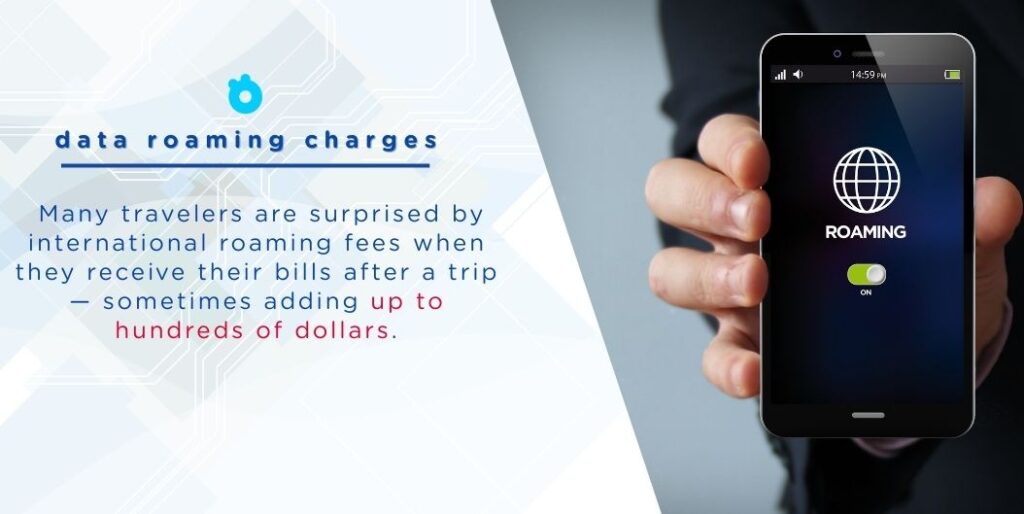
Data roaming can be convenient, but it is often one of the most expensive ways to use mobile data abroad.
When your phone connects to a foreign network, your home carrier may need to pay the local carrier for network access. That cost can then be passed on to you through international roaming fees, daily roaming passes, or pay-per-use data charges.
The problem is that mobile data usage can add up quickly while traveling. Even simple travel activities may use more data than expected, including:
– Opening Google Maps or Apple Maps
– Loading ride-hailing apps
– Checking email attachments
– Sending photos or videos through messaging apps
– Browsing social media
– Using translation apps
– Streaming music or videos
– Syncing photos, apps, or cloud files in the background
This is why some travelers only notice the real cost of roaming after their trip, when they receive a higher-than-expected phone bill.
Common Reasons Roaming Charges Add Up
1. Pay-Per-Use Pricing
Some carriers charge roaming data based on actual usage. If your plan does not include international data, every megabyte used abroad may create extra cost.
This can become expensive because modern apps often use data automatically in the background.
2. Daily Roaming Passes
Many carriers offer international day passes. These are easier to understand than pay-per-use roaming, but they can still become costly on longer trips.
For example, a daily roaming pass may feel reasonable for a two-day business trip, but it can become expensive for a 10-day or 14-day vacation.
3. Background Data Usage
Your phone may continue using data even when you are not actively browsing. App updates, photo backups, email syncing, location services, and notifications can all consume mobile data in the background.
If roaming is enabled, this background activity may count toward your roaming usage.
4. Unclear Pricing Before Travel
Roaming prices are not always easy to understand. Some carrier plans include limited roaming, some charge by destination, and others require a separate international package.
Because of this, travelers may not know exactly what they will pay until after they have already used the data.
Is Data Roaming Always Expensive?
Not always.
Data roaming cost depends on your carrier, destination, and mobile plan. Some plans include international roaming in selected countries, while others charge extra. A travel eSIM may also require data roaming to be turned on, but the cost is already controlled by the prepaid eSIM plan.
The key difference is billing.
With traditional roaming, you may be charged by your home carrier after usage. With a prepaid travel eSIM, you usually choose and pay for a specific data plan before using it.
That makes travel eSIMs a more predictable option for many international travelers.
Should Data Roaming Be On or Off?
For most international travelers, data roaming should be turned off unless you have already checked your mobile plan or installed a prepaid travel eSIM.
If data roaming is on while you are abroad, your phone may connect to a foreign mobile network and use mobile data outside your home carrier’s network. This can lead to extra charges if your plan does not include international roaming.
A simple rule:
- Keep data roaming off if you do not have an international roaming plan.
- Turn data roaming on only if your carrier plan includes roaming, or your travel eSIM provider tells you to enable it.
- Use Wi-Fi when possible if you are unsure about your roaming charges.
How to Turn Data Roaming On or Off
You can control data roaming from your phone settings before or during your trip.
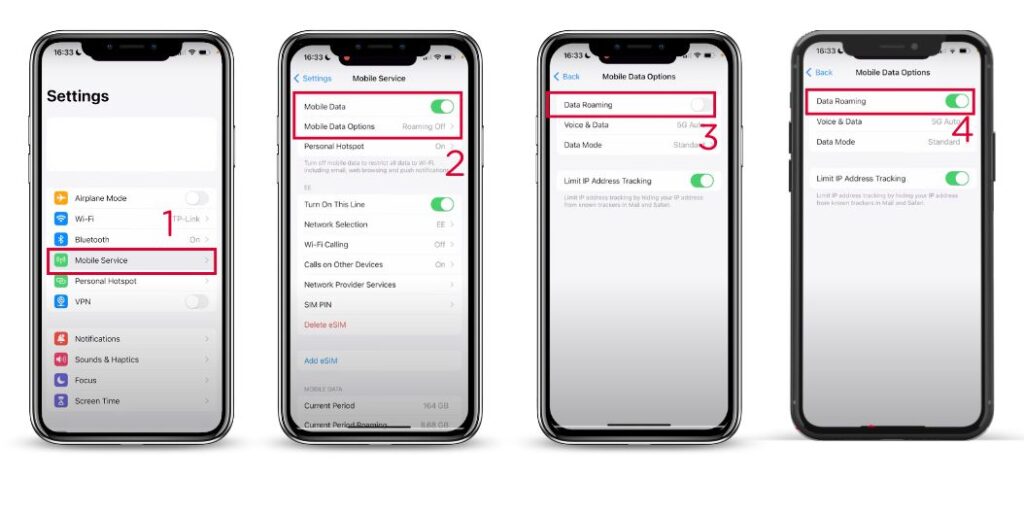
On iPhone
- Open Settings
- Tap Cellular or Mobile Data
- Select Cellular Data Options
- Turn Data Roaming on or off
If you are using dual SIM or eSIM, make sure you select the correct mobile line before changing roaming settings.
On Android
The exact menu may vary depending on your phone brand, but the steps are usually similar:
- Open Settings
- Go to Connections or Network & Internet
- Tap Mobile Networks or SIMs
- Turn Data Roaming on or off
On some Android devices, roaming settings may appear under the specific SIM or eSIM profile.
Important: Some Travel eSIMs Need Data Roaming On
Turning data roaming on does not always mean you will be charged by your home carrier.
Some travel eSIMs require data roaming to be enabled so the eSIM can connect to its supported local partner network in your destination country. In this case, the roaming setting helps the travel eSIM work properly.
The key is to check which mobile line is using data.
Before you travel, make sure:
- Your travel eSIM is selected for mobile data.
- Your home SIM is not selected for mobile data abroad.
- Data roaming is enabled only for the eSIM if the provider requires it.
- Your home carrier’s roaming data is turned off if you want to avoid extra charges.
This is especially important for iPhone users with dual SIM. You can keep your home number active for calls or texts while using your travel eSIM for mobile data.
How to Monitor Mobile Data Usage While Traveling
Even with an eSIM, local SIM, or roaming package, it is still useful to monitor your data usage.
On iPhone
- Open Settings
- Tap Cellular or Mobile Data
- Scroll down to check data usage by app
- Tap Reset Statistics before your trip to track travel usage more accurately
On Android
- Open Settings
- Go to Network & Internet or Connections
- Tap Data Usage
- Set a data warning or data limit if available
You can also check data usage inside your carrier app or eSIM provider app if they offer real-time tracking.
Quick Checklist Before You Travel
Before leaving for an international trip, check these settings:
- Turn off data roaming on your home SIM if you do not have a roaming plan.
- Install and activate your travel eSIM before departure if possible.
- Select the travel eSIM as your mobile data line.
- Enable data roaming for the travel eSIM only if required.
- Turn off background app refresh or automatic cloud backups.
- Download offline maps, hotel details, and travel documents.
Best Alternatives to Data Roaming
You do not have to rely on expensive carrier roaming every time you travel abroad. Depending on your destination, trip length, phone compatibility, and budget, there are several better ways to stay connected.
The most common alternatives are travel eSIMs, local SIM cards, international day passes, and Wi-Fi.
1. Travel eSIM: Best for Most International Travelers
A travel eSIM is a digital SIM that lets you install a prepaid data plan on your phone without using a physical SIM card.
Instead of paying roaming fees to your home carrier, you buy a data plan for your destination before or during your trip. After installation, you can use mobile data abroad through the eSIM plan.
A travel eSIM is useful because:
- You can install it before departure.
- You do not need to find a SIM card shop after landing.
- You can keep your home SIM active for calls or texts.
- You can choose a prepaid data package upfront.
- Many eSIM plans support multiple countries or regions.
- There is no physical SIM card to swap or lose.
For most travelers, this is the easiest way to avoid traditional roaming charges while still using mobile data abroad.
However, your phone must support eSIM, and some eSIM plans may require data roaming to be enabled on the eSIM line.
2. Local SIM Card: Good for Longer Single-Country Trips
A local SIM card can be a budget-friendly option if you are staying in one country for a longer period.
You buy a SIM card from a local mobile provider, insert it into your phone, and use a local data plan. In many destinations, local SIM cards offer affordable data and strong domestic coverage.
A local SIM may work well if:
- You are staying in one country for several weeks.
- You need a local phone number.
- Your phone has an unlocked physical SIM slot.
- You do not mind buying and setting up the SIM after arrival.
The downside is convenience. You may need to find a SIM shop, show your passport, compare plans, queue at the airport, or deal with language barriers. You may also need to remove your home SIM if your phone has only one physical SIM slot.
3. International Day Pass: Convenient but Can Add Up
Some mobile carriers offer international day passes. These allow you to use your regular plan abroad for a fixed daily fee.
This option can be convenient because you keep your normal phone number, billing, and carrier setup. It may work well for short business trips or emergency use.
However, day passes can become expensive on longer vacations. A daily fee that feels acceptable for one or two days may become costly over a 10-day or 14-day trip.
Before choosing this option, check:
- The daily fee
- Included destinations
- Data allowance or speed limits
- Whether charges start automatically when data is used
- Whether your trip length makes the total cost too high
4. Public Wi-Fi: Free but Less Reliable
Public Wi-Fi can help reduce mobile data usage, especially at hotels, airports, cafés, and shopping malls.
It is useful for:
- Checking messages
- Downloading maps
- Uploading photos
- Making calls through messaging apps
- Watching videos at your hotel
However, Wi-Fi is not always available when you need it most. It may be slow, unstable, or unsafe on public networks. You also cannot rely on Wi-Fi when using maps on the street, booking rides, translating menus, or handling urgent travel changes.
If you use public Wi-Fi, avoid logging into sensitive accounts unless the network is trusted. A VPN can add another layer of protection, especially on open public networks.
Data Roaming Alternatives: Quick Comparison
| Option | Best For | Main Benefit | Main Drawback |
|---|---|---|---|
| Travel eSIM | Most international travelers | Prepaid, fast setup, no SIM swap | Requires eSIM-compatible phone |
| Local SIM Card | Longer single-country trips | Often cheap local data | Setup after arrival, may need passport |
| International Day Pass | Short trips or business travel | Easy to use with your home carrier | Daily fees can add up |
| Public Wi-Fi | Light use at hotels, airports, cafés | Free access | Limited coverage and security risks |
Which Option Should You Choose?
Choose a travel eSIM if you want the easiest prepaid option for mobile data abroad.
Choose a local SIM card if you are staying in one country for a longer time and want a local number.
Choose an international day pass if your trip is very short and you prefer using your home carrier.
Use public Wi-Fi as a backup, but do not depend on it as your only connection while traveling.
For most modern travelers, a prepaid travel eSIM offers the best balance of convenience, cost control, and flexibility.
Looking for a simple roaming alternative? Gohub offers prepaid travel eSIM plans for 190+ destinations, so you can install your data plan before departure and connect when you arrive.
Smart Data Usage Tips While Traveling
Even if you use a travel eSIM, local SIM card, or international roaming plan, it is still smart to control your mobile data usage while traveling.
Many apps use data in the background without you noticing. By adjusting a few settings before your trip, you can reduce unnecessary data use and make your travel data plan last longer.
1. Download Offline Maps Before You Go
Maps can use a lot of mobile data, especially when you are moving around a new city all day.
Before your trip, download offline maps for:
- Your arrival airport
- Your hotel area
- Main tourist districts
- Train stations or bus terminals
- Day trip destinations
Google Maps and Apple Maps both allow offline map downloads in many locations. This helps you navigate even when your mobile signal is weak or when you want to save data.
2. Save Important Travel Documents Offline
Do not rely on mobile data every time you need to open a booking confirmation or travel document.
Save offline copies of:
- Boarding passes
- Hotel reservations
- Train or bus tickets
- Travel insurance documents
- Visa or entry documents
- Tour booking confirmations
- Emergency contact details
You can save them in your phone files, notes app, wallet app, or screenshots folder.
3. Turn Off Background Data for Non-Essential Apps
Some apps keep syncing even when you are not actively using them. This can quickly consume data while traveling.
Before departure, consider limiting background data for:
- Cloud photo backups
- App store updates
- Video apps
- Music streaming apps
- Social media apps
- Email apps with large attachments
On iPhone, you can turn off Background App Refresh for selected apps.
On Android, you can restrict Background Data or enable Data Saver mode.
4. Disable Auto-Play and Auto-Download
Social media and messaging apps can use a surprising amount of data through auto-play videos and automatic media downloads.
Before traveling, adjust settings in apps like:
- TikTok
- Telegram
- Messenger
- YouTube
Turn off auto-play videos and disable automatic downloads for photos, videos, and large files when using mobile data.
5. Use Wi-Fi for Heavy Data Tasks
Use hotel or trusted Wi-Fi for activities that consume a lot of data, such as:
- Uploading photos and videos
- Backing up files to the cloud
- Downloading Netflix or YouTube content
- Updating apps
- Joining long video calls
- Syncing large work files
This helps preserve your mobile data for important travel tasks like maps, messaging, ride-hailing, and translation.
6. Track Your Data Usage During the Trip
Check your mobile data usage regularly, especially on the first day of your trip.
This helps you understand how fast you are using data and whether you need to adjust your habits.
You can track usage through:
- iPhone Cellular or Mobile Data settings
- Android Data Usage settings
- Your carrier app
- Your eSIM provider app, if available
If your plan has limited data, try checking usage once a day during your trip.
Data Roaming vs International Plans vs Travel eSIMs
Not all roaming options work the same way. Some travelers use standard data roaming from their home carrier, while others buy an international day pass, a roaming package, a local SIM card, or a travel eSIM.
The main difference is how you pay and how much control you have before the trip.
1. Standard Data Roaming
Standard data roaming means your phone connects to a foreign partner network through your home carrier.
This is convenient because you do not need to install anything new. However, it can be expensive if your mobile plan does not include international data.
Standard roaming is best used for emergencies or very light use, unless your plan clearly includes affordable roaming in your destination.
2. International Day Passes
An international day pass lets you use your home carrier’s service abroad for a fixed daily fee.
This is usually easier to understand than pay-per-use roaming. You keep your normal phone number and use your existing carrier setup.
However, daily fees can become expensive on longer trips. A day pass may be reasonable for a short business trip, but less cost-effective for a one-week or two-week vacation.
3. Roaming Packages
Some carriers offer travel data packages for specific countries, regions, or time periods.
These packages may include a fixed data allowance, such as a few gigabytes for 7, 14, or 30 days. They can be more predictable than standard roaming, but prices and coverage vary widely by carrier and destination.
Before buying a roaming package, check:
- Which countries are included
- How much data you get
- Whether speeds are reduced after a limit
- Whether calls and texts are included
- What happens when the package runs out
4. Travel eSIMs
A travel eSIM is different from traditional carrier roaming because it is usually prepaid.
You choose a destination or regional data plan, install the eSIM digitally, and use that plan for mobile data abroad. This gives you more control over cost before you travel.
A travel eSIM is especially useful if you want to:
- Avoid open-ended roaming charges
- Install your data plan before departure
- Keep your home SIM active for calls or texts
- Travel across multiple countries
- Avoid buying a physical SIM card after landing
Some travel eSIMs require data roaming to be turned on for the eSIM line. This does not mean your home carrier will charge you, as long as your mobile data is assigned to the travel eSIM and not your home SIM.
Quick Comparison: Roaming Options for Travelers
| Option | Payment Style | Ease of Setup | Cost Control | Best For |
|---|---|---|---|---|
| Standard data roaming | Charged by home carrier | Very easy | Low | Emergency use |
| International day pass | Daily fixed fee | Easy | Medium | Short trips |
| Roaming package | Prepaid or add-on | Medium | Medium | Carrier-loyal travelers |
| Travel eSIM | Prepaid data plan | Easy | High | Most international travelers |
Which Roaming Option Is Best?
If you only need data for a short emergency, standard roaming may be enough.
If you are taking a short business trip and want maximum convenience, an international day pass may work.
If you prefer staying with your home carrier, a roaming package may be worth checking.
But if you want clearer upfront pricing, simple setup, and better control over mobile data abroad, a prepaid travel eSIM is usually the better option for most travelers.
The Future of Travel Connectivity
Travel connectivity is moving toward more flexible, prepaid, and digital options. As more phones support eSIM, travelers can install data plans before departure, switch between mobile profiles, and avoid relying only on traditional carrier roaming.
5G roaming may improve speeds in major cities, while satellite internet may become useful for remote destinations in the future. However, for most international travelers today, a prepaid travel eSIM remains one of the simplest ways to control cost and stay connected abroad.
Before every trip, check your roaming settings, review your carrier’s international fees, and choose a data option that matches your destination, trip length, and usage needs.
FAQs About Data Roaming
1. What is data roaming?
Data roaming means your phone uses mobile data on another carrier’s network when you are outside your home network. This usually happens when you travel internationally and your phone connects to a foreign mobile network.
2. Should data roaming be on or off when traveling?
Data roaming should usually be off when traveling abroad unless you have an international roaming plan or a travel eSIM that requires roaming to be enabled. If you are unsure about your carrier’s roaming charges, keep it off to avoid unexpected fees.
3. What happens if data roaming is on?
If data roaming is on, your phone may connect to a foreign mobile network and use mobile data abroad. This allows apps, maps, email, and browsers to work, but it may create extra charges if your plan does not include international roaming.
4. Is data roaming the same as mobile data?
No. Mobile data is the general internet connection your phone uses through a cellular network. Data roaming happens when your phone uses mobile data outside your home carrier’s network, usually through a partner network abroad.
5. Does data roaming use more data?
Data roaming does not automatically use more data than normal mobile data. However, roaming can feel more expensive because the cost per megabyte, daily fee, or international package price may be higher than your regular domestic data plan.
6. Can I use Wi-Fi if data roaming is off?
Yes. Turning off data roaming only stops your phone from using mobile data on foreign networks. You can still connect to Wi-Fi at hotels, airports, cafés, restaurants, and other public places.
7. Do I need data roaming on for an eSIM?
Sometimes. Some travel eSIMs require data roaming to be turned on so the eSIM can connect to its supported local network. This does not mean your home carrier will charge you, as long as your mobile data line is set to the travel eSIM and not your home SIM.
8. How do I avoid roaming charges abroad?
To avoid roaming charges, turn off data roaming on your home SIM, use Wi-Fi when possible, download offline maps before your trip, and consider using a prepaid travel eSIM or local SIM card for mobile data abroad.
9. Is a travel eSIM better than data roaming?
For many travelers, a travel eSIM is better than traditional roaming because it is usually prepaid and easier to control. You can choose a data plan before your trip instead of relying on open-ended roaming charges from your home carrier.
10. Should I remove my home SIM when using a travel eSIM?
Usually, you do not need to remove your home SIM. On many phones, you can keep your home SIM active for calls or texts and use your travel eSIM for mobile data. Just make sure your travel eSIM is selected as the mobile data line.
Conclusion: Stay Connected Abroad Without Roaming Bill Shock
Data roaming helps your phone stay connected when you travel outside your home network, but it can also lead to unexpected charges if you do not understand how your carrier bills international usage.
Before your next trip, check whether your mobile plan includes roaming in your destination. If it does not, turn off data roaming on your home SIM, download key travel information offline, and avoid using mobile data until you have a clear connection plan.
For many travelers, a prepaid travel eSIM is one of the simplest ways to avoid traditional roaming fees. You can choose your data plan before departure, install it digitally, and use mobile data abroad with clearer upfront pricing.
The best travel setup is simple: keep your home number available when needed, use a prepaid data option for internet access, and check your roaming settings before you fly.
Ready to avoid roaming surprises on your next trip? Explore Gohub travel eSIM plans and get connected abroad with prepaid data, simple setup, and no physical SIM swap.
Articles You May Like
- eSIM vs International Roaming Cost — Compare roaming fees, day passes, and prepaid eSIM plans.
- 5 Best Alternatives to Expensive Roaming Charges — Explore better ways to stay connected abroad.
- How to Install and Use an eSIM — Learn how to set up your travel eSIM before departure.
- List of eSIM-Compatible Phones — Check whether your device supports eSIM.
- Japan Travel eSIM — Get connected in Japan without relying on carrier roaming.
What Does Data Roaming Mean?
Data roaming means your phone is using mobile data on a network that does not belong to your home carrier.
This usually happens when you travel to another country. For example, if your regular mobile plan is from the United States and you travel to Japan, your phone may connect to a Japanese mobile network so you can continue using internet services abroad.
With data roaming, you can still use:
- Google Maps or Apple Maps
- Messaging apps like WhatsApp, iMessage, or Messenger
- Email and web browsing
- Ride-hailing apps
- Translation apps
- Social media
- Travel booking apps
The benefit is convenience. Your phone can stay connected even when your home carrier does not operate in the country you are visiting.
The risk is cost. If your mobile plan does not include international roaming, your carrier may charge extra fees for every megabyte, day, or data package used abroad.
How Does Data Roaming Work?
International data roaming works through agreements between mobile carriers.
When you travel outside your home network’s coverage area, your phone searches for available mobile networks in the destination country. If your home carrier has a roaming agreement with one of those networks, your phone can connect to it.
Here is the basic process:
1. Your Phone Leaves the Home Network
Once your device is outside your carrier’s coverage area, it can no longer connect directly to your usual network.
2. Your Phone Finds a Partner Network
Your phone scans for available mobile networks in the country you are visiting. It may automatically connect to a partner network based on your carrier’s roaming agreements.
3. You Use Mobile Data as Usual
After the connection is active, apps like maps, browsers, messaging platforms, and email continue working almost the same way they do at home.
4. Your Home Carrier Handles the Billing
Even though you are using a foreign network, your home carrier usually handles the final billing. Depending on your plan, this may be included, charged as a daily pass, billed per megabyte, or added as an international roaming fee.
This is why data roaming can feel invisible while you are using it, but become expensive later when the bill arrives.
Note: Data roaming is not always bad. It depends on the plan you are using. Traditional carrier roaming can be expensive, but some prepaid travel eSIMs require data roaming to be turned on so the eSIM can connect to its supported local network.
Why Can Data Roaming Be Expensive?
Data roaming can be convenient, but it is often one of the most expensive ways to use mobile data abroad.
When your phone connects to a foreign network, your home carrier may need to pay the local carrier for network access. That cost can then be passed on to you through international roaming fees, daily roaming passes, or pay-per-use data charges.
The problem is that mobile data usage can add up quickly while traveling. Even simple travel activities may use more data than expected, including:
– Opening Google Maps or Apple Maps
– Loading ride-hailing apps
– Checking email attachments
– Sending photos or videos through messaging apps
– Browsing social media
– Using translation apps
– Streaming music or videos
– Syncing photos, apps, or cloud files in the background
This is why some travelers only notice the real cost of roaming after their trip, when they receive a higher-than-expected phone bill.
Common Reasons Roaming Charges Add Up
1. Pay-Per-Use Pricing
Some carriers charge roaming data based on actual usage. If your plan does not include international data, every megabyte used abroad may create extra cost.
This can become expensive because modern apps often use data automatically in the background.
2. Daily Roaming Passes
Many carriers offer international day passes. These are easier to understand than pay-per-use roaming, but they can still become costly on longer trips.
For example, a daily roaming pass may feel reasonable for a two-day business trip, but it can become expensive for a 10-day or 14-day vacation.
3. Background Data Usage
Your phone may continue using data even when you are not actively browsing. App updates, photo backups, email syncing, location services, and notifications can all consume mobile data in the background.
If roaming is enabled, this background activity may count toward your roaming usage.
4. Unclear Pricing Before Travel
Roaming prices are not always easy to understand. Some carrier plans include limited roaming, some charge by destination, and others require a separate international package.
Because of this, travelers may not know exactly what they will pay until after they have already used the data.
Is Data Roaming Always Expensive?
Not always.
Data roaming cost depends on your carrier, destination, and mobile plan. Some plans include international roaming in selected countries, while others charge extra. A travel eSIM may also require data roaming to be turned on, but the cost is already controlled by the prepaid eSIM plan.
The key difference is billing.
With traditional roaming, you may be charged by your home carrier after usage. With a prepaid travel eSIM, you usually choose and pay for a specific data plan before using it.
That makes travel eSIMs a more predictable option for many international travelers.
Should Data Roaming Be On or Off?
For most international travelers, data roaming should be turned off unless you have already checked your mobile plan or installed a prepaid travel eSIM.
If data roaming is on while you are abroad, your phone may connect to a foreign mobile network and use mobile data outside your home carrier’s network. This can lead to extra charges if your plan does not include international roaming.
A simple rule:
- Keep data roaming off if you do not have an international roaming plan.
- Turn data roaming on only if your carrier plan includes roaming, or your travel eSIM provider tells you to enable it.
- Use Wi-Fi when possible if you are unsure about your roaming charges.
How to Turn Data Roaming On or Off
You can control data roaming from your phone settings before or during your trip.
On iPhone
- Open Settings
- Tap Cellular or Mobile Data
- Select Cellular Data Options
- Turn Data Roaming on or off
If you are using dual SIM or eSIM, make sure you select the correct mobile line before changing roaming settings.
On Android
The exact menu may vary depending on your phone brand, but the steps are usually similar:
- Open Settings
- Go to Connections or Network & Internet
- Tap Mobile Networks or SIMs
- Turn Data Roaming on or off
On some Android devices, roaming settings may appear under the specific SIM or eSIM profile.
Important: Some Travel eSIMs Need Data Roaming On
Turning data roaming on does not always mean you will be charged by your home carrier.
Some travel eSIMs require data roaming to be enabled so the eSIM can connect to its supported local partner network in your destination country. In this case, the roaming setting helps the travel eSIM work properly.
The key is to check which mobile line is using data.
Before you travel, make sure:
- Your travel eSIM is selected for mobile data.
- Your home SIM is not selected for mobile data abroad.
- Data roaming is enabled only for the eSIM if the provider requires it.
- Your home carrier’s roaming data is turned off if you want to avoid extra charges.
This is especially important for iPhone users with dual SIM. You can keep your home number active for calls or texts while using your travel eSIM for mobile data.
How to Monitor Mobile Data Usage While Traveling
Even with an eSIM, local SIM, or roaming package, it is still useful to monitor your data usage.
On iPhone
- Open Settings
- Tap Cellular or Mobile Data
- Scroll down to check data usage by app
- Tap Reset Statistics before your trip to track travel usage more accurately
On Android
- Open Settings
- Go to Network & Internet or Connections
- Tap Data Usage
- Set a data warning or data limit if available
You can also check data usage inside your carrier app or eSIM provider app if they offer real-time tracking.
Quick Checklist Before You Travel
Before leaving for an international trip, check these settings:
- Turn off data roaming on your home SIM if you do not have a roaming plan.
- Install and activate your travel eSIM before departure if possible.
- Select the travel eSIM as your mobile data line.
- Enable data roaming for the travel eSIM only if required.
- Turn off background app refresh or automatic cloud backups.
- Download offline maps, hotel details, and travel documents.
Best Alternatives to Data Roaming
You do not have to rely on expensive carrier roaming every time you travel abroad. Depending on your destination, trip length, phone compatibility, and budget, there are several better ways to stay connected.
The most common alternatives are travel eSIMs, local SIM cards, international day passes, and Wi-Fi.
1. Travel eSIM: Best for Most International Travelers
A travel eSIM is a digital SIM that lets you install a prepaid data plan on your phone without using a physical SIM card.
Instead of paying roaming fees to your home carrier, you buy a data plan for your destination before or during your trip. After installation, you can use mobile data abroad through the eSIM plan.
A travel eSIM is useful because:
- You can install it before departure.
- You do not need to find a SIM card shop after landing.
- You can keep your home SIM active for calls or texts.
- You can choose a prepaid data package upfront.
- Many eSIM plans support multiple countries or regions.
- There is no physical SIM card to swap or lose.
For most travelers, this is the easiest way to avoid traditional roaming charges while still using mobile data abroad.
However, your phone must support eSIM, and some eSIM plans may require data roaming to be enabled on the eSIM line.
2. Local SIM Card: Good for Longer Single-Country Trips
A local SIM card can be a budget-friendly option if you are staying in one country for a longer period.
You buy a SIM card from a local mobile provider, insert it into your phone, and use a local data plan. In many destinations, local SIM cards offer affordable data and strong domestic coverage.
A local SIM may work well if:
- You are staying in one country for several weeks.
- You need a local phone number.
- Your phone has an unlocked physical SIM slot.
- You do not mind buying and setting up the SIM after arrival.
The downside is convenience. You may need to find a SIM shop, show your passport, compare plans, queue at the airport, or deal with language barriers. You may also need to remove your home SIM if your phone has only one physical SIM slot.
3. International Day Pass: Convenient but Can Add Up
Some mobile carriers offer international day passes. These allow you to use your regular plan abroad for a fixed daily fee.
This option can be convenient because you keep your normal phone number, billing, and carrier setup. It may work well for short business trips or emergency use.
However, day passes can become expensive on longer vacations. A daily fee that feels acceptable for one or two days may become costly over a 10-day or 14-day trip.
Before choosing this option, check:
- The daily fee
- Included destinations
- Data allowance or speed limits
- Whether charges start automatically when data is used
- Whether your trip length makes the total cost too high
4. Public Wi-Fi: Free but Less Reliable
Public Wi-Fi can help reduce mobile data usage, especially at hotels, airports, cafés, and shopping malls.
It is useful for:
- Checking messages
- Downloading maps
- Uploading photos
- Making calls through messaging apps
- Watching videos at your hotel
However, Wi-Fi is not always available when you need it most. It may be slow, unstable, or unsafe on public networks. You also cannot rely on Wi-Fi when using maps on the street, booking rides, translating menus, or handling urgent travel changes.
If you use public Wi-Fi, avoid logging into sensitive accounts unless the network is trusted. A VPN can add another layer of protection, especially on open public networks.
Data Roaming Alternatives: Quick Comparison
| Option | Best For | Main Benefit | Main Drawback |
|---|---|---|---|
| Travel eSIM | Most international travelers | Prepaid, fast setup, no SIM swap | Requires eSIM-compatible phone |
| Local SIM Card | Longer single-country trips | Often cheap local data | Setup after arrival, may need passport |
| International Day Pass | Short trips or business travel | Easy to use with your home carrier | Daily fees can add up |
| Public Wi-Fi | Light use at hotels, airports, cafés | Free access | Limited coverage and security risks |
Which Option Should You Choose?
Choose a travel eSIM if you want the easiest prepaid option for mobile data abroad.
Choose a local SIM card if you are staying in one country for a longer time and want a local number.
Choose an international day pass if your trip is very short and you prefer using your home carrier.
Use public Wi-Fi as a backup, but do not depend on it as your only connection while traveling.
For most modern travelers, a prepaid travel eSIM offers the best balance of convenience, cost control, and flexibility.
Looking for a simple roaming alternative? Gohub offers prepaid travel eSIM plans for 190+ destinations, so you can install your data plan before departure and connect when you arrive.
Smart Data Usage Tips While Traveling
Even if you use a travel eSIM, local SIM card, or international roaming plan, it is still smart to control your mobile data usage while traveling.
Many apps use data in the background without you noticing. By adjusting a few settings before your trip, you can reduce unnecessary data use and make your travel data plan last longer.
1. Download Offline Maps Before You Go
Maps can use a lot of mobile data, especially when you are moving around a new city all day.
Before your trip, download offline maps for:
- Your arrival airport
- Your hotel area
- Main tourist districts
- Train stations or bus terminals
- Day trip destinations
Google Maps and Apple Maps both allow offline map downloads in many locations. This helps you navigate even when your mobile signal is weak or when you want to save data.
2. Save Important Travel Documents Offline
Do not rely on mobile data every time you need to open a booking confirmation or travel document.
Save offline copies of:
- Boarding passes
- Hotel reservations
- Train or bus tickets
- Travel insurance documents
- Visa or entry documents
- Tour booking confirmations
- Emergency contact details
You can save them in your phone files, notes app, wallet app, or screenshots folder.
3. Turn Off Background Data for Non-Essential Apps
Some apps keep syncing even when you are not actively using them. This can quickly consume data while traveling.
Before departure, consider limiting background data for:
- Cloud photo backups
- App store updates
- Video apps
- Music streaming apps
- Social media apps
- Email apps with large attachments
On iPhone, you can turn off Background App Refresh for selected apps.
On Android, you can restrict Background Data or enable Data Saver mode.
4. Disable Auto-Play and Auto-Download
Social media and messaging apps can use a surprising amount of data through auto-play videos and automatic media downloads.
Before traveling, adjust settings in apps like:
- TikTok
- Telegram
- Messenger
- YouTube
Turn off auto-play videos and disable automatic downloads for photos, videos, and large files when using mobile data.
5. Use Wi-Fi for Heavy Data Tasks
Use hotel or trusted Wi-Fi for activities that consume a lot of data, such as:
- Uploading photos and videos
- Backing up files to the cloud
- Downloading Netflix or YouTube content
- Updating apps
- Joining long video calls
- Syncing large work files
This helps preserve your mobile data for important travel tasks like maps, messaging, ride-hailing, and translation.
6. Track Your Data Usage During the Trip
Check your mobile data usage regularly, especially on the first day of your trip.
This helps you understand how fast you are using data and whether you need to adjust your habits.
You can track usage through:
- iPhone Cellular or Mobile Data settings
- Android Data Usage settings
- Your carrier app
- Your eSIM provider app, if available
If your plan has limited data, try checking usage once a day during your trip.
Data Roaming vs International Plans vs Travel eSIMs
Not all roaming options work the same way. Some travelers use standard data roaming from their home carrier, while others buy an international day pass, a roaming package, a local SIM card, or a travel eSIM.
The main difference is how you pay and how much control you have before the trip.
1. Standard Data Roaming
Standard data roaming means your phone connects to a foreign partner network through your home carrier.
This is convenient because you do not need to install anything new. However, it can be expensive if your mobile plan does not include international data.
Standard roaming is best used for emergencies or very light use, unless your plan clearly includes affordable roaming in your destination.
2. International Day Passes
An international day pass lets you use your home carrier’s service abroad for a fixed daily fee.
This is usually easier to understand than pay-per-use roaming. You keep your normal phone number and use your existing carrier setup.
However, daily fees can become expensive on longer trips. A day pass may be reasonable for a short business trip, but less cost-effective for a one-week or two-week vacation.
3. Roaming Packages
Some carriers offer travel data packages for specific countries, regions, or time periods.
These packages may include a fixed data allowance, such as a few gigabytes for 7, 14, or 30 days. They can be more predictable than standard roaming, but prices and coverage vary widely by carrier and destination.
Before buying a roaming package, check:
- Which countries are included
- How much data you get
- Whether speeds are reduced after a limit
- Whether calls and texts are included
- What happens when the package runs out
4. Travel eSIMs
A travel eSIM is different from traditional carrier roaming because it is usually prepaid.
You choose a destination or regional data plan, install the eSIM digitally, and use that plan for mobile data abroad. This gives you more control over cost before you travel.
A travel eSIM is especially useful if you want to:
- Avoid open-ended roaming charges
- Install your data plan before departure
- Keep your home SIM active for calls or texts
- Travel across multiple countries
- Avoid buying a physical SIM card after landing
Some travel eSIMs require data roaming to be turned on for the eSIM line. This does not mean your home carrier will charge you, as long as your mobile data is assigned to the travel eSIM and not your home SIM.
Quick Comparison: Roaming Options for Travelers
| Option | Payment Style | Ease of Setup | Cost Control | Best For |
|---|---|---|---|---|
| Standard data roaming | Charged by home carrier | Very easy | Low | Emergency use |
| International day pass | Daily fixed fee | Easy | Medium | Short trips |
| Roaming package | Prepaid or add-on | Medium | Medium | Carrier-loyal travelers |
| Travel eSIM | Prepaid data plan | Easy | High | Most international travelers |
Which Roaming Option Is Best?
If you only need data for a short emergency, standard roaming may be enough.
If you are taking a short business trip and want maximum convenience, an international day pass may work.
If you prefer staying with your home carrier, a roaming package may be worth checking.
But if you want clearer upfront pricing, simple setup, and better control over mobile data abroad, a prepaid travel eSIM is usually the better option for most travelers.
The Future of Travel Connectivity
Travel connectivity is moving toward more flexible, prepaid, and digital options. As more phones support eSIM, travelers can install data plans before departure, switch between mobile profiles, and avoid relying only on traditional carrier roaming.
5G roaming may improve speeds in major cities, while satellite internet may become useful for remote destinations in the future. However, for most international travelers today, a prepaid travel eSIM remains one of the simplest ways to control cost and stay connected abroad.
Before every trip, check your roaming settings, review your carrier’s international fees, and choose a data option that matches your destination, trip length, and usage needs.
FAQs About Data Roaming
1. What is data roaming?
Data roaming means your phone uses mobile data on another carrier’s network when you are outside your home network. This usually happens when you travel internationally and your phone connects to a foreign mobile network.
2. Should data roaming be on or off when traveling?
Data roaming should usually be off when traveling abroad unless you have an international roaming plan or a travel eSIM that requires roaming to be enabled. If you are unsure about your carrier’s roaming charges, keep it off to avoid unexpected fees.
3. What happens if data roaming is on?
If data roaming is on, your phone may connect to a foreign mobile network and use mobile data abroad. This allows apps, maps, email, and browsers to work, but it may create extra charges if your plan does not include international roaming.
4. Is data roaming the same as mobile data?
No. Mobile data is the general internet connection your phone uses through a cellular network. Data roaming happens when your phone uses mobile data outside your home carrier’s network, usually through a partner network abroad.
5. Does data roaming use more data?
Data roaming does not automatically use more data than normal mobile data. However, roaming can feel more expensive because the cost per megabyte, daily fee, or international package price may be higher than your regular domestic data plan.
6. Can I use Wi-Fi if data roaming is off?
Yes. Turning off data roaming only stops your phone from using mobile data on foreign networks. You can still connect to Wi-Fi at hotels, airports, cafés, restaurants, and other public places.
7. Do I need data roaming on for an eSIM?
Sometimes. Some travel eSIMs require data roaming to be turned on so the eSIM can connect to its supported local network. This does not mean your home carrier will charge you, as long as your mobile data line is set to the travel eSIM and not your home SIM.
8. How do I avoid roaming charges abroad?
To avoid roaming charges, turn off data roaming on your home SIM, use Wi-Fi when possible, download offline maps before your trip, and consider using a prepaid travel eSIM or local SIM card for mobile data abroad.
9. Is a travel eSIM better than data roaming?
For many travelers, a travel eSIM is better than traditional roaming because it is usually prepaid and easier to control. You can choose a data plan before your trip instead of relying on open-ended roaming charges from your home carrier.
10. Should I remove my home SIM when using a travel eSIM?
Usually, you do not need to remove your home SIM. On many phones, you can keep your home SIM active for calls or texts and use your travel eSIM for mobile data. Just make sure your travel eSIM is selected as the mobile data line.
Conclusion: Stay Connected Abroad Without Roaming Bill Shock
Data roaming helps your phone stay connected when you travel outside your home network, but it can also lead to unexpected charges if you do not understand how your carrier bills international usage.
Before your next trip, check whether your mobile plan includes roaming in your destination. If it does not, turn off data roaming on your home SIM, download key travel information offline, and avoid using mobile data until you have a clear connection plan.
For many travelers, a prepaid travel eSIM is one of the simplest ways to avoid traditional roaming fees. You can choose your data plan before departure, install it digitally, and use mobile data abroad with clearer upfront pricing.
The best travel setup is simple: keep your home number available when needed, use a prepaid data option for internet access, and check your roaming settings before you fly.
Ready to avoid roaming surprises on your next trip? Explore Gohub travel eSIM plans and get connected abroad with prepaid data, simple setup, and no physical SIM swap.
Articles You May Like
- eSIM vs International Roaming Cost — Compare roaming fees, day passes, and prepaid eSIM plans.
- 5 Best Alternatives to Expensive Roaming Charges — Explore better ways to stay connected abroad.
- How to Install and Use an eSIM — Learn how to set up your travel eSIM before departure.
- List of eSIM-Compatible Phones — Check whether your device supports eSIM.
- Japan Travel eSIM — Get connected in Japan without relying on carrier roaming.
Introduction
Using mobile data abroad can feel simple: you land, turn on your phone, open maps, check messages, and everything works. But behind that convenience is something many travelers do not fully understand: data roaming.
Data roaming happens when your phone connects to a mobile network outside your home carrier’s coverage area. This usually occurs when you travel internationally and your device uses a foreign partner network to access the internet.
The problem is that roaming can be expensive if your mobile plan does not include international data. Even basic activities like opening Google Maps, checking email, using WhatsApp, or scrolling social media can create extra charges depending on your carrier’s roaming policy.
This guide explains what data roaming means, how it works, whether you should turn it on or off, why roaming charges can be high, and how to avoid surprise fees when traveling abroad. You will also learn when data roaming is needed for travel eSIMs and how to stay connected with more predictable options like prepaid eSIM plans, local SIM cards, and Wi-Fi.
Quick Answer: What Is Data Roaming?
Data roaming means your phone uses mobile data on another carrier’s network when you are outside your home network. For travelers, this usually happens when visiting another country.
When data roaming is on, your phone can connect to a foreign mobile network so you can use apps, maps, browsers, email, and messaging services. However, if your home carrier charges for international roaming, this can lead to extra fees.
In general, you should keep data roaming off when traveling abroad unless you have an international roaming package or a prepaid travel eSIM that specifically requires roaming to be enabled.
For most travelers, a prepaid travel eSIM is a more predictable way to stay online abroad because you pay upfront for a data plan instead of relying on open-ended carrier roaming charges.
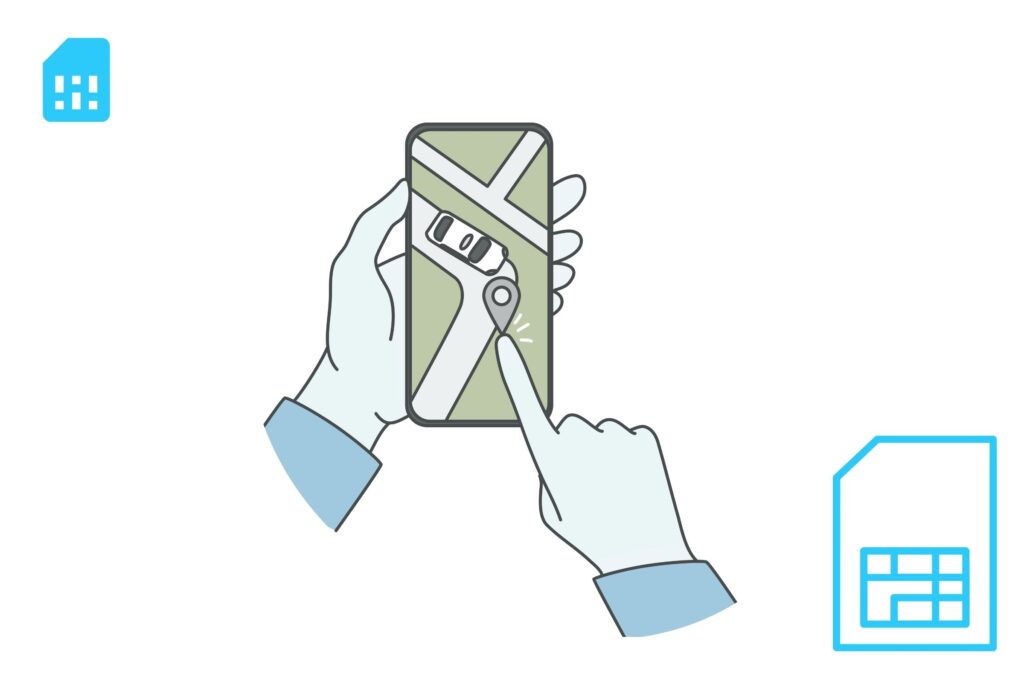
Traveling soon? A prepaid Gohub eSIM helps you stay connected abroad without relying on expensive carrier roaming. Install before departure, connect when you arrive, and use mobile data with clearer upfront pricing.
What Does Data Roaming Mean?
Data roaming means your phone is using mobile data on a network that does not belong to your home carrier.
This usually happens when you travel to another country. For example, if your regular mobile plan is from the United States and you travel to Japan, your phone may connect to a Japanese mobile network so you can continue using internet services abroad.
With data roaming, you can still use:
- Google Maps or Apple Maps
- Messaging apps like WhatsApp, iMessage, or Messenger
- Email and web browsing
- Ride-hailing apps
- Translation apps
- Social media
- Travel booking apps
The benefit is convenience. Your phone can stay connected even when your home carrier does not operate in the country you are visiting.
The risk is cost. If your mobile plan does not include international roaming, your carrier may charge extra fees for every megabyte, day, or data package used abroad.
How Does Data Roaming Work?
International data roaming works through agreements between mobile carriers.
When you travel outside your home network’s coverage area, your phone searches for available mobile networks in the destination country. If your home carrier has a roaming agreement with one of those networks, your phone can connect to it.
Here is the basic process:
1. Your Phone Leaves the Home Network
Once your device is outside your carrier’s coverage area, it can no longer connect directly to your usual network.
2. Your Phone Finds a Partner Network
Your phone scans for available mobile networks in the country you are visiting. It may automatically connect to a partner network based on your carrier’s roaming agreements.
3. You Use Mobile Data as Usual
After the connection is active, apps like maps, browsers, messaging platforms, and email continue working almost the same way they do at home.
4. Your Home Carrier Handles the Billing
Even though you are using a foreign network, your home carrier usually handles the final billing. Depending on your plan, this may be included, charged as a daily pass, billed per megabyte, or added as an international roaming fee.
This is why data roaming can feel invisible while you are using it, but become expensive later when the bill arrives.
Note: Data roaming is not always bad. It depends on the plan you are using. Traditional carrier roaming can be expensive, but some prepaid travel eSIMs require data roaming to be turned on so the eSIM can connect to its supported local network.
Why Can Data Roaming Be Expensive?
Data roaming can be convenient, but it is often one of the most expensive ways to use mobile data abroad.
When your phone connects to a foreign network, your home carrier may need to pay the local carrier for network access. That cost can then be passed on to you through international roaming fees, daily roaming passes, or pay-per-use data charges.
The problem is that mobile data usage can add up quickly while traveling. Even simple travel activities may use more data than expected, including:
– Opening Google Maps or Apple Maps
– Loading ride-hailing apps
– Checking email attachments
– Sending photos or videos through messaging apps
– Browsing social media
– Using translation apps
– Streaming music or videos
– Syncing photos, apps, or cloud files in the background
This is why some travelers only notice the real cost of roaming after their trip, when they receive a higher-than-expected phone bill.
Common Reasons Roaming Charges Add Up
1. Pay-Per-Use Pricing
Some carriers charge roaming data based on actual usage. If your plan does not include international data, every megabyte used abroad may create extra cost.
This can become expensive because modern apps often use data automatically in the background.
2. Daily Roaming Passes
Many carriers offer international day passes. These are easier to understand than pay-per-use roaming, but they can still become costly on longer trips.
For example, a daily roaming pass may feel reasonable for a two-day business trip, but it can become expensive for a 10-day or 14-day vacation.
3. Background Data Usage
Your phone may continue using data even when you are not actively browsing. App updates, photo backups, email syncing, location services, and notifications can all consume mobile data in the background.
If roaming is enabled, this background activity may count toward your roaming usage.
4. Unclear Pricing Before Travel
Roaming prices are not always easy to understand. Some carrier plans include limited roaming, some charge by destination, and others require a separate international package.
Because of this, travelers may not know exactly what they will pay until after they have already used the data.
Is Data Roaming Always Expensive?
Not always.
Data roaming cost depends on your carrier, destination, and mobile plan. Some plans include international roaming in selected countries, while others charge extra. A travel eSIM may also require data roaming to be turned on, but the cost is already controlled by the prepaid eSIM plan.
The key difference is billing.
With traditional roaming, you may be charged by your home carrier after usage. With a prepaid travel eSIM, you usually choose and pay for a specific data plan before using it.
That makes travel eSIMs a more predictable option for many international travelers.
Should Data Roaming Be On or Off?
For most international travelers, data roaming should be turned off unless you have already checked your mobile plan or installed a prepaid travel eSIM.
If data roaming is on while you are abroad, your phone may connect to a foreign mobile network and use mobile data outside your home carrier’s network. This can lead to extra charges if your plan does not include international roaming.
A simple rule:
- Keep data roaming off if you do not have an international roaming plan.
- Turn data roaming on only if your carrier plan includes roaming, or your travel eSIM provider tells you to enable it.
- Use Wi-Fi when possible if you are unsure about your roaming charges.
How to Turn Data Roaming On or Off
You can control data roaming from your phone settings before or during your trip.
On iPhone
- Open Settings
- Tap Cellular or Mobile Data
- Select Cellular Data Options
- Turn Data Roaming on or off
If you are using dual SIM or eSIM, make sure you select the correct mobile line before changing roaming settings.
On Android
The exact menu may vary depending on your phone brand, but the steps are usually similar:
- Open Settings
- Go to Connections or Network & Internet
- Tap Mobile Networks or SIMs
- Turn Data Roaming on or off
On some Android devices, roaming settings may appear under the specific SIM or eSIM profile.
Important: Some Travel eSIMs Need Data Roaming On
Turning data roaming on does not always mean you will be charged by your home carrier.
Some travel eSIMs require data roaming to be enabled so the eSIM can connect to its supported local partner network in your destination country. In this case, the roaming setting helps the travel eSIM work properly.
The key is to check which mobile line is using data.
Before you travel, make sure:
- Your travel eSIM is selected for mobile data.
- Your home SIM is not selected for mobile data abroad.
- Data roaming is enabled only for the eSIM if the provider requires it.
- Your home carrier’s roaming data is turned off if you want to avoid extra charges.
This is especially important for iPhone users with dual SIM. You can keep your home number active for calls or texts while using your travel eSIM for mobile data.
How to Monitor Mobile Data Usage While Traveling
Even with an eSIM, local SIM, or roaming package, it is still useful to monitor your data usage.
On iPhone
- Open Settings
- Tap Cellular or Mobile Data
- Scroll down to check data usage by app
- Tap Reset Statistics before your trip to track travel usage more accurately
On Android
- Open Settings
- Go to Network & Internet or Connections
- Tap Data Usage
- Set a data warning or data limit if available
You can also check data usage inside your carrier app or eSIM provider app if they offer real-time tracking.
Quick Checklist Before You Travel
Before leaving for an international trip, check these settings:
- Turn off data roaming on your home SIM if you do not have a roaming plan.
- Install and activate your travel eSIM before departure if possible.
- Select the travel eSIM as your mobile data line.
- Enable data roaming for the travel eSIM only if required.
- Turn off background app refresh or automatic cloud backups.
- Download offline maps, hotel details, and travel documents.
Best Alternatives to Data Roaming
You do not have to rely on expensive carrier roaming every time you travel abroad. Depending on your destination, trip length, phone compatibility, and budget, there are several better ways to stay connected.
The most common alternatives are travel eSIMs, local SIM cards, international day passes, and Wi-Fi.
1. Travel eSIM: Best for Most International Travelers
A travel eSIM is a digital SIM that lets you install a prepaid data plan on your phone without using a physical SIM card.
Instead of paying roaming fees to your home carrier, you buy a data plan for your destination before or during your trip. After installation, you can use mobile data abroad through the eSIM plan.
A travel eSIM is useful because:
- You can install it before departure.
- You do not need to find a SIM card shop after landing.
- You can keep your home SIM active for calls or texts.
- You can choose a prepaid data package upfront.
- Many eSIM plans support multiple countries or regions.
- There is no physical SIM card to swap or lose.
For most travelers, this is the easiest way to avoid traditional roaming charges while still using mobile data abroad.
However, your phone must support eSIM, and some eSIM plans may require data roaming to be enabled on the eSIM line.
2. Local SIM Card: Good for Longer Single-Country Trips
A local SIM card can be a budget-friendly option if you are staying in one country for a longer period.
You buy a SIM card from a local mobile provider, insert it into your phone, and use a local data plan. In many destinations, local SIM cards offer affordable data and strong domestic coverage.
A local SIM may work well if:
- You are staying in one country for several weeks.
- You need a local phone number.
- Your phone has an unlocked physical SIM slot.
- You do not mind buying and setting up the SIM after arrival.
The downside is convenience. You may need to find a SIM shop, show your passport, compare plans, queue at the airport, or deal with language barriers. You may also need to remove your home SIM if your phone has only one physical SIM slot.
3. International Day Pass: Convenient but Can Add Up
Some mobile carriers offer international day passes. These allow you to use your regular plan abroad for a fixed daily fee.
This option can be convenient because you keep your normal phone number, billing, and carrier setup. It may work well for short business trips or emergency use.
However, day passes can become expensive on longer vacations. A daily fee that feels acceptable for one or two days may become costly over a 10-day or 14-day trip.
Before choosing this option, check:
- The daily fee
- Included destinations
- Data allowance or speed limits
- Whether charges start automatically when data is used
- Whether your trip length makes the total cost too high
4. Public Wi-Fi: Free but Less Reliable
Public Wi-Fi can help reduce mobile data usage, especially at hotels, airports, cafés, and shopping malls.
It is useful for:
- Checking messages
- Downloading maps
- Uploading photos
- Making calls through messaging apps
- Watching videos at your hotel
However, Wi-Fi is not always available when you need it most. It may be slow, unstable, or unsafe on public networks. You also cannot rely on Wi-Fi when using maps on the street, booking rides, translating menus, or handling urgent travel changes.
If you use public Wi-Fi, avoid logging into sensitive accounts unless the network is trusted. A VPN can add another layer of protection, especially on open public networks.
Data Roaming Alternatives: Quick Comparison
| Option | Best For | Main Benefit | Main Drawback |
|---|---|---|---|
| Travel eSIM | Most international travelers | Prepaid, fast setup, no SIM swap | Requires eSIM-compatible phone |
| Local SIM Card | Longer single-country trips | Often cheap local data | Setup after arrival, may need passport |
| International Day Pass | Short trips or business travel | Easy to use with your home carrier | Daily fees can add up |
| Public Wi-Fi | Light use at hotels, airports, cafés | Free access | Limited coverage and security risks |
Which Option Should You Choose?
Choose a travel eSIM if you want the easiest prepaid option for mobile data abroad.
Choose a local SIM card if you are staying in one country for a longer time and want a local number.
Choose an international day pass if your trip is very short and you prefer using your home carrier.
Use public Wi-Fi as a backup, but do not depend on it as your only connection while traveling.
For most modern travelers, a prepaid travel eSIM offers the best balance of convenience, cost control, and flexibility.
Looking for a simple roaming alternative? Gohub offers prepaid travel eSIM plans for 190+ destinations, so you can install your data plan before departure and connect when you arrive.
Smart Data Usage Tips While Traveling
Even if you use a travel eSIM, local SIM card, or international roaming plan, it is still smart to control your mobile data usage while traveling.
Many apps use data in the background without you noticing. By adjusting a few settings before your trip, you can reduce unnecessary data use and make your travel data plan last longer.
1. Download Offline Maps Before You Go
Maps can use a lot of mobile data, especially when you are moving around a new city all day.
Before your trip, download offline maps for:
- Your arrival airport
- Your hotel area
- Main tourist districts
- Train stations or bus terminals
- Day trip destinations
Google Maps and Apple Maps both allow offline map downloads in many locations. This helps you navigate even when your mobile signal is weak or when you want to save data.
2. Save Important Travel Documents Offline
Do not rely on mobile data every time you need to open a booking confirmation or travel document.
Save offline copies of:
- Boarding passes
- Hotel reservations
- Train or bus tickets
- Travel insurance documents
- Visa or entry documents
- Tour booking confirmations
- Emergency contact details
You can save them in your phone files, notes app, wallet app, or screenshots folder.
3. Turn Off Background Data for Non-Essential Apps
Some apps keep syncing even when you are not actively using them. This can quickly consume data while traveling.
Before departure, consider limiting background data for:
- Cloud photo backups
- App store updates
- Video apps
- Music streaming apps
- Social media apps
- Email apps with large attachments
On iPhone, you can turn off Background App Refresh for selected apps.
On Android, you can restrict Background Data or enable Data Saver mode.
4. Disable Auto-Play and Auto-Download
Social media and messaging apps can use a surprising amount of data through auto-play videos and automatic media downloads.
Before traveling, adjust settings in apps like:
- TikTok
- Telegram
- Messenger
- YouTube
Turn off auto-play videos and disable automatic downloads for photos, videos, and large files when using mobile data.
5. Use Wi-Fi for Heavy Data Tasks
Use hotel or trusted Wi-Fi for activities that consume a lot of data, such as:
- Uploading photos and videos
- Backing up files to the cloud
- Downloading Netflix or YouTube content
- Updating apps
- Joining long video calls
- Syncing large work files
This helps preserve your mobile data for important travel tasks like maps, messaging, ride-hailing, and translation.
6. Track Your Data Usage During the Trip
Check your mobile data usage regularly, especially on the first day of your trip.
This helps you understand how fast you are using data and whether you need to adjust your habits.
You can track usage through:
- iPhone Cellular or Mobile Data settings
- Android Data Usage settings
- Your carrier app
- Your eSIM provider app, if available
If your plan has limited data, try checking usage once a day during your trip.
Data Roaming vs International Plans vs Travel eSIMs
Not all roaming options work the same way. Some travelers use standard data roaming from their home carrier, while others buy an international day pass, a roaming package, a local SIM card, or a travel eSIM.
The main difference is how you pay and how much control you have before the trip.
1. Standard Data Roaming
Standard data roaming means your phone connects to a foreign partner network through your home carrier.
This is convenient because you do not need to install anything new. However, it can be expensive if your mobile plan does not include international data.
Standard roaming is best used for emergencies or very light use, unless your plan clearly includes affordable roaming in your destination.
2. International Day Passes
An international day pass lets you use your home carrier’s service abroad for a fixed daily fee.
This is usually easier to understand than pay-per-use roaming. You keep your normal phone number and use your existing carrier setup.
However, daily fees can become expensive on longer trips. A day pass may be reasonable for a short business trip, but less cost-effective for a one-week or two-week vacation.
3. Roaming Packages
Some carriers offer travel data packages for specific countries, regions, or time periods.
These packages may include a fixed data allowance, such as a few gigabytes for 7, 14, or 30 days. They can be more predictable than standard roaming, but prices and coverage vary widely by carrier and destination.
Before buying a roaming package, check:
- Which countries are included
- How much data you get
- Whether speeds are reduced after a limit
- Whether calls and texts are included
- What happens when the package runs out
4. Travel eSIMs
A travel eSIM is different from traditional carrier roaming because it is usually prepaid.
You choose a destination or regional data plan, install the eSIM digitally, and use that plan for mobile data abroad. This gives you more control over cost before you travel.
A travel eSIM is especially useful if you want to:
- Avoid open-ended roaming charges
- Install your data plan before departure
- Keep your home SIM active for calls or texts
- Travel across multiple countries
- Avoid buying a physical SIM card after landing
Some travel eSIMs require data roaming to be turned on for the eSIM line. This does not mean your home carrier will charge you, as long as your mobile data is assigned to the travel eSIM and not your home SIM.
Quick Comparison: Roaming Options for Travelers
| Option | Payment Style | Ease of Setup | Cost Control | Best For |
|---|---|---|---|---|
| Standard data roaming | Charged by home carrier | Very easy | Low | Emergency use |
| International day pass | Daily fixed fee | Easy | Medium | Short trips |
| Roaming package | Prepaid or add-on | Medium | Medium | Carrier-loyal travelers |
| Travel eSIM | Prepaid data plan | Easy | High | Most international travelers |
Which Roaming Option Is Best?
If you only need data for a short emergency, standard roaming may be enough.
If you are taking a short business trip and want maximum convenience, an international day pass may work.
If you prefer staying with your home carrier, a roaming package may be worth checking.
But if you want clearer upfront pricing, simple setup, and better control over mobile data abroad, a prepaid travel eSIM is usually the better option for most travelers.
The Future of Travel Connectivity
Travel connectivity is moving toward more flexible, prepaid, and digital options. As more phones support eSIM, travelers can install data plans before departure, switch between mobile profiles, and avoid relying only on traditional carrier roaming.
5G roaming may improve speeds in major cities, while satellite internet may become useful for remote destinations in the future. However, for most international travelers today, a prepaid travel eSIM remains one of the simplest ways to control cost and stay connected abroad.
Before every trip, check your roaming settings, review your carrier’s international fees, and choose a data option that matches your destination, trip length, and usage needs.
FAQs About Data Roaming
1. What is data roaming?
Data roaming means your phone uses mobile data on another carrier’s network when you are outside your home network. This usually happens when you travel internationally and your phone connects to a foreign mobile network.
2. Should data roaming be on or off when traveling?
Data roaming should usually be off when traveling abroad unless you have an international roaming plan or a travel eSIM that requires roaming to be enabled. If you are unsure about your carrier’s roaming charges, keep it off to avoid unexpected fees.
3. What happens if data roaming is on?
If data roaming is on, your phone may connect to a foreign mobile network and use mobile data abroad. This allows apps, maps, email, and browsers to work, but it may create extra charges if your plan does not include international roaming.
4. Is data roaming the same as mobile data?
No. Mobile data is the general internet connection your phone uses through a cellular network. Data roaming happens when your phone uses mobile data outside your home carrier’s network, usually through a partner network abroad.
5. Does data roaming use more data?
Data roaming does not automatically use more data than normal mobile data. However, roaming can feel more expensive because the cost per megabyte, daily fee, or international package price may be higher than your regular domestic data plan.
6. Can I use Wi-Fi if data roaming is off?
Yes. Turning off data roaming only stops your phone from using mobile data on foreign networks. You can still connect to Wi-Fi at hotels, airports, cafés, restaurants, and other public places.
7. Do I need data roaming on for an eSIM?
Sometimes. Some travel eSIMs require data roaming to be turned on so the eSIM can connect to its supported local network. This does not mean your home carrier will charge you, as long as your mobile data line is set to the travel eSIM and not your home SIM.
8. How do I avoid roaming charges abroad?
To avoid roaming charges, turn off data roaming on your home SIM, use Wi-Fi when possible, download offline maps before your trip, and consider using a prepaid travel eSIM or local SIM card for mobile data abroad.
9. Is a travel eSIM better than data roaming?
For many travelers, a travel eSIM is better than traditional roaming because it is usually prepaid and easier to control. You can choose a data plan before your trip instead of relying on open-ended roaming charges from your home carrier.
10. Should I remove my home SIM when using a travel eSIM?
Usually, you do not need to remove your home SIM. On many phones, you can keep your home SIM active for calls or texts and use your travel eSIM for mobile data. Just make sure your travel eSIM is selected as the mobile data line.
Conclusion: Stay Connected Abroad Without Roaming Bill Shock
Data roaming helps your phone stay connected when you travel outside your home network, but it can also lead to unexpected charges if you do not understand how your carrier bills international usage.
Before your next trip, check whether your mobile plan includes roaming in your destination. If it does not, turn off data roaming on your home SIM, download key travel information offline, and avoid using mobile data until you have a clear connection plan.
For many travelers, a prepaid travel eSIM is one of the simplest ways to avoid traditional roaming fees. You can choose your data plan before departure, install it digitally, and use mobile data abroad with clearer upfront pricing.
The best travel setup is simple: keep your home number available when needed, use a prepaid data option for internet access, and check your roaming settings before you fly.
Ready to avoid roaming surprises on your next trip? Explore Gohub travel eSIM plans and get connected abroad with prepaid data, simple setup, and no physical SIM swap.
Articles You May Like
- eSIM vs International Roaming Cost — Compare roaming fees, day passes, and prepaid eSIM plans.
- 5 Best Alternatives to Expensive Roaming Charges — Explore better ways to stay connected abroad.
- How to Install and Use an eSIM — Learn how to set up your travel eSIM before departure.
- List of eSIM-Compatible Phones — Check whether your device supports eSIM.
- Japan Travel eSIM — Get connected in Japan without relying on carrier roaming.