





Ever wondered whether your phone supports eSIM before buying a travel eSIM? You’re not alone. With more smartphones, tablets, smartwatches, and laptops adopting eSIM technology, checking compatibility has become an essential step before traveling abroad.
Most iPhones from the iPhone XR onward, Samsung Galaxy S20 series and newer, Google Pixel 4 and later, and selected models from Xiaomi, Huawei, OPPO, Motorola, Honor, and Vivo support eSIM. However, compatibility can vary depending on the exact model, carrier restrictions, and the region where the device was purchased.
In this guide, you’ll find a complete list of eSIM compatible phones and other devices, learn how to check if your device supports eSIM, discover which models do not support eSIM, and understand common compatibility issues that travelers often encounter.
Whether you’re a frequent traveler, digital nomad, or simply looking for a more convenient alternative to roaming, this guide will help you quickly determine if your device is eSIM-ready and choose the best way to stay connected abroad.
I. Quick eSIM Compatibility Chart (2026)
If you’re wondering whether your device supports eSIM, here’s the short answer. Most modern flagship phones released in the last few years are eSIM-ready, but support varies by brand and region.
| Brand | eSIM Support Starts From | Notes |
|---|---|---|
| Apple | iPhone XR / XS | China and most Hong Kong models do not support eSIM |
| Samsung | Galaxy S20 Series | Some carrier and regional variants may differ |
| Google Pixel | Pixel 4 Series | Hong Kong variants do not support eSIM |
| Huawei | P40 Series | Only selected global models support eSIM |
| Xiaomi | Xiaomi 12T Pro | Support varies by model and market |
| Motorola | Edge 30 Series | Global models are generally supported |
| OPPO | Find X3 Pro | Mainly EU and Japanese variants |
| Sony | Xperia 10 III Lite | Most global models support eSIM |
| Honor | Honor 90 | Availability depends on region |
| Vivo | X90 Pro | Global models only |
Tip: Even if your phone model supports eSIM, devices sold in mainland China and some Hong Kong variants may not include eSIM functionality. Always check your exact model and region before purchasing a travel eSIM.
Need a Faster Way to Check?
Not sure whether your exact device supports eSIM?
Instead of searching through settings or browsing forums, you can use Gohub’s free eSIM Device Checker to verify your phone in seconds.
✔ Supports iPhone, Samsung, Pixel, Xiaomi, Huawei, OPPO and more
✔ No technical knowledge required
✔ Instant compatibility results
II. Why the Buzz About eSIMs? Understanding the Benefits
Okay, so why is everyone raving about eSIMs lately — and not just the tech bros on Reddit?
Imagine this: You’ve just landed in Tokyo. Instead of wandering around Narita Airport looking for a SIM kiosk (with suitcase in one hand and jet lag in the other ), you whip out your phone, tap a few buttons, and boom — you’re connected. That’s the magic of eSIM.
Whether you’re exploring ancient temples in Kyoto, closing deals in Singapore, or working remotely from a beach bar in Bali, here’s why travel eSIMs are taking over:
- Total Convenience: No more fiddling with tiny SIM trays or hunting for paperclips. Everything’s managed digitally through your device. Easy peasy.
- Seamless Network Switching: Arrived in a new country? Switch to a local plan in minutes. No roaming fees, no stress.
- Multiple Profiles, One Device: Store work, personal, and travel eSIMs all on the same phone. Most devices let you switch between them easily.
- Perfect for Travelers: Activate your eSIM before takeoff or right after landing. No more overpriced airport SIMs or mystery data charges from your home carrier.
- Dual SIM Power: Many devices let you use both a physical SIM and an eSIM at the same time — super handy for keeping your main number while using local data.
- Slimmer Devices: Without a SIM tray, phones can be slimmer, lighter, and more durable. Great news for minimalists (or clumsy backpackers like me ).
- Bonus Security Points: Because the eSIM is embedded and not easily removable, it can offer added protection if your phone is lost or stolen. (Still… maybe don’t test this.)
TL;DR? eSIMs offer flexibility, freedom, and fewer headaches — exactly what travelers need in 2025.
And if you’re wondering “Okay but… will it work on my phone?” — don’t worry. That’s exactly what we’re about to explore next.
III. Is My Device eSIM Ready? The Essential Compatibility Check
So you’re sold on the magic of eSIMs (who wouldn’t be?), but now comes the million-dollar question:
“Is my phone even eSIM compatible?”
Don’t worry — we’ve all googled that in a rush at the airport. Let’s break it down so you can know for sure before buying your travel eSIM.
A. How to Check If Your Phone Supports eSIM
Here are a few simple ways to find out if your phone is part of the eSIM-compatible phones club:
1. Dial Code Check
- Open your phone app and dial
*#06# - Look for something called an EID (Embedded Identity Document)
👉 If you see it = good news, your device likely supports eSIM!
2. Check Your Settings
- iPhone: Go to Settings > Mobile Data > Add eSIM
- Android (Samsung, Google, etc.): Try Settings > Connections > SIM Card Manager, or look for “Add eSIM” or “Download SIM profile”
⚠️ Note: These paths can vary slightly by phone model and software version.
3. Use an eSIM App (like Gohub )
If you’re shopping for an eSIM through Gohub or another trusted provider, we’ll often show compatibility right on the product page — no guessing games needed.
4. Check the Official Device Specs
Head to the manufacturer’s website and search your exact model. This is especially important for brands like Huawei, Xiaomi, or Samsung, where eSIM support may vary by region.
5. Instantly Check if Your Phone Supports eSIM — with Gohub
Instead of digging through your settings or searching random forums, just use the Gohub eSIM Device Checker — it’s fast, free, and made exactly for this.
In under five seconds, you’ll know whether your phone is eSIM-compatible and ready for a travel eSIM. All you have to do is type in your device name — we’ll do the rest. No tech skills needed, no guessing.
👉 Check Your eSIM Device Instantly
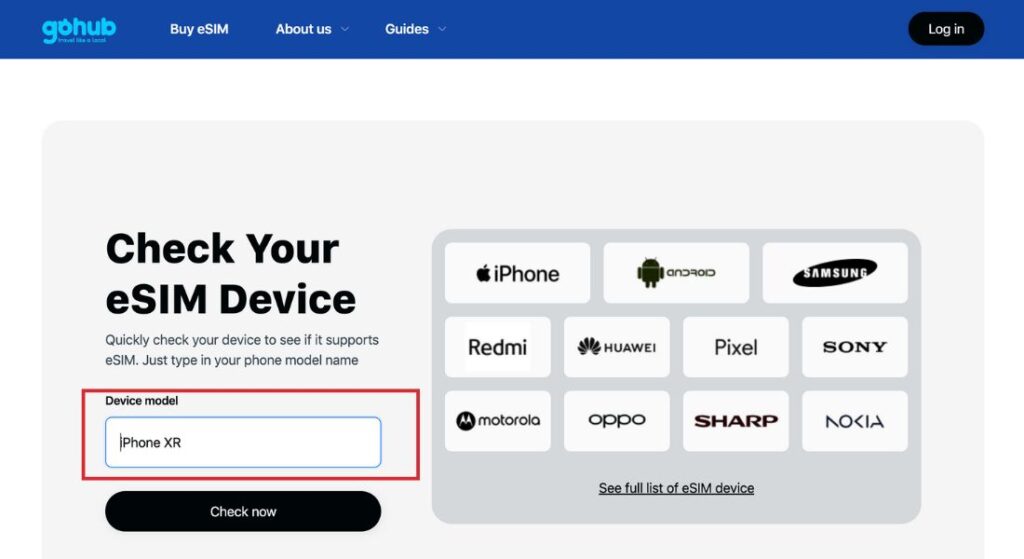
Image: Check your eSIM device screenshot
B. Common Compatibility Gotchas (Read Before You Buy)
Even if your phone model supports eSIM, here are a few curveballs that might trip you up:
- Your Phone Must Be Unlocked: If your device is still locked to a carrier (e.g. Verizon, Telstra), you won’t be able to install an eSIM from another provider.
Check your unlock status or ask your original carrier to unlock it. - Region Matters: Phones sold in China, Hong Kong, or Taiwan often don’t include eSIM functionality — even if the same model in the US or EU does.
- Some Models Just Don’t Have It:
- Example: Huawei P40 Pro+ → no eSIM
- Samsung FE (Fan Edition) phones → mostly not eSIM compatible
- iPhone models before XR → nope.
- 🔧 Jailbroken / Rooted Phones: If you’ve modded your device, eSIM might not play nice.
C. TL;DR Compatibility Tips
- Check for EID
- Go into your SIM/Mobile settings
- Make sure your phone is unlocked
- Know your phone’s region
- Cross-check our 2026 eSIM Compatibility List in the next section
Next Up:
Let’s dive into the ultimate, up-to-date list of eSIM-compatible phones, tablets, laptops, watches — and yes, even cars.
IV. The Ultimate List of eSIM Compatible Phones (2026 Edition)
So your phone passed the compatibility check? Nice. Now let’s confirm it’s on the official list. We’ve compiled the most updated and travel-relevant list of eSIM-supported phones as of January 2026 — organized by brand, with notes on regional quirks and model exceptions. Bookmark this for your next trip!
Apple iPhones – Most Reliable for eSIM
All models from iPhone XR and newer support eSIM.
Compatible iPhones:
| Model | eSIM Support | Notes |
|---|---|---|
| iPhone XR / XS / XS Max | ✅ | First iPhones with eSIM |
| iPhone 11 / 11 Pro / Pro Max | ✅ | Full support |
| iPhone SE (2020 / 2022) | ✅ | Compact, eSIM-ready |
| iPhone 12 / 13 / 14 / 15 / 16 Series | ✅ | All models support eSIM |
| iPhone 14 / 15 / 16 / 17 (US models) | ✅ | eSIM-only in the US (no physical SIM tray) |
| iPhone 16e | ✅ | Budget model with eSIM |
| iPhone 17 / 17 Pro / 17 Pro Max | ✅ | Full eSIM support on global models |
| iPhones from China / Hong Kong | ❌ | No eSIM support on mainland China models; most Hong Kong models also lack eSIM |
Regional Notes:
- iPhones sold in mainland China and most of Hong Kong do not support eSIM.
- Exception: Hong Kong iPhone 13+ dual-SIM physical models may support eSIM if purchased internationally.
Samsung Galaxy Phones – eSIM Compatibility Guide
Compatible Samsung Models (Global or US/EU variants):
| Model Series | Compatible Models | Notes |
|---|---|---|
| S Series | S20, S20+, S20 UltraS21, S21+, S21 UltraS22, S22+, S22 UltraS23, S23+, S23 UltraS24, S24+, S24 UltraS25, S25+, S25 Ultra | ✅ Most models support eSIM globally❗ Some US carrier Ultra models may vary |
| FE Series | S23 FE, S24 FE | ⚠️ eSIM support depends on region (EU/Global usually OK; HK/China no) |
| Note Series | Note20, Note20 Ultra | ✅ Global models supported❗ US & HK Ultra models may lack eSIM |
| Foldables | Z Fold2, Fold3, Fold4, Fold5, Fold6Z Flip3, Flip4, Flip5, Flip6 | ✅ eSIM supported on global models❗ US/HK variants may not support |
| A Series | A35 5G, A36 5GA54 5G, A55 5G, A56 5G | ✅ Selected newer models only❗ Check for “Add eSIM” in settings |
| Rugged | XCover7 | ✅ Supported |
| Tablet | Galaxy Tab Active5 | ✅ Enterprise-level support |
Regional & Model Notes:
- Most Samsung phones from China, Hong Kong, Taiwan do not support eSIM — even if the same model in the US or Europe does.
- “FE” (Fan Edition) models have mixed support. Double-check your specific region.
- US versions of some Ultra/Fold models might not support eSIM if bought through carriers.
Google Pixel Phones-eSIM Compatibility Guide
Google was an early eSIM adopter — most Pixels from 2018 onward have great eSIM support.
Compatible Pixel Models:
| Model | eSIM Support | Notes |
|---|---|---|
| Pixel 2 / 2 XL | ⚠️ Limited | eSIM works only with Google Fi |
| Pixel 3 / 3 XL | ⚠️ Region-specific | No eSIM on models from Japan, Australia, SE Asia, or non-Fi US carriers |
| Pixel 3a / 3a XL | ⚠️ Region-specific | No eSIM on Japan, SEA, or Verizon models |
| Pixel 4 / 4 XL / 4a / 4a 5G | ✅ | Full eSIM support |
| Pixel 5 / 5a | ✅ | eSIM supported (except Hong Kong models) |
| Pixel 6 / 6 Pro / 6a | ✅ | Stable eSIM support |
| Pixel 7 / 7 Pro / 7a | ✅ | Full compatibility |
| Pixel 8 / 8 Pro / 8a | ✅ | Dual eSIM supported |
| Pixel 9 / 9 Pro / 9 Pro XL | ✅ | Latest models with advanced eSIM support |
| Pixel Fold / Pixel 9 Fold | ✅ | Foldable Pixel line supports eSIM |
| Pixels sold in Hong Kong | ❌ | No eSIM support on HK variants |
Heads-up: All Pixel phones sold in Hong Kong do not support eSIM. Double-check regional variants before purchase.
Other Popular eSIM-Compatible Phones in Asia & Beyond
Here are more great options if you’re using a Huawei, Xiaomi, or other Android brand popular in Asia.
Huawei Phones – eSIM Compatibility Guide
| Model | eSIM Support | Notes |
|---|---|---|
| Huawei P40 | ✅ | Global models support eSIM |
| Huawei P40 Pro | ✅ | Global models only |
| Huawei P40 Pro+ | ❌ | No eSIM support |
| Huawei Mate 40 Pro | ✅ | eSIM supported on global variants |
| Huawei P50 Pro | ⚠️ Limited | eSIM available in some regions only |
| Huawei Mate Xs | ✅ | Foldable with eSIM |
| Huawei Mate Xs 2 | ✅ | eSIM supported |
| Huawei Mate X2 | ⚠️ Limited | eSIM varies by market |
| Huawei P60 Pro | ❌ | No eSIM support |
| Huawei Mate 50 Pro | ❌ | No eSIM support |
| Huawei Mate 60 / 60 Pro | ❌ | No eSIM support |
| Huawei devices from China | ❌ | No eSIM support on mainland China models |
Important: Huawei devices sold in mainland China do not support eSIM.
Only selected global models (mainly P40 series and certain foldables) include eSIM functionality.
Newer Huawei flagship phones released after 2022 generally do not support eSIM.
Xiaomi Phones – eSIM Compatibility Guide
| Model | eSIM Support | Notes |
|---|---|---|
| Xiaomi 12T Pro | ✅ | Pro version only supports eSIM |
| Xiaomi 13 | ✅ | Global models support eSIM |
| Xiaomi 13 Lite | ✅ | eSIM supported in EU/Global variants |
| Xiaomi 13 Pro | ✅ | Flagship with eSIM |
| Xiaomi 13T / 13T Pro | ✅ | Full eSIM support |
| Xiaomi 14 | ✅ | eSIM supported on global models |
| Xiaomi 14 Pro | ✅ | Global versions support eSIM |
| Xiaomi 14 Ultra | ❌ | No eSIM support |
| Redmi Note 13 Pro+ | ⚠️ Limited | Some regions only; check device settings |
| Redmi Note 14 Pro+ | ⚠️ Limited | Regional availability varies |
| Redmi 13C | ❌ | No eSIM support |
| Xiaomi phones from China / Hong Kong | ❌ | eSIM not supported on CN/HK variants |
Important: Xiaomi eSIM support varies by model and region.
Devices sold in mainland China or Hong Kong do not support eSIM, even if the same model does in Europe or other global markets.
Always check Settings → Mobile Network → Add eSIM before purchasing a travel eSIM.
Motorola Phones – eSIM Compatibility Guide
| Model | eSIM Support | Notes |
|---|---|---|
| Moto Edge 30 / 30 Pro | ✅ | Global models support eSIM |
| Moto Edge 40 / 40 Pro / 40 Neo | ✅ | Full eSIM support |
| Moto Edge 50 / 50 Pro / 50 Fusion / 50 Ultra | ✅ | Latest Edge series with eSIM |
| Moto Razr (2022) | ✅ | Foldable with eSIM |
| Moto Razr 40 / 40 Ultra | ✅ | Global models support eSIM |
| Moto Razr 50 / 50 Ultra | ✅ | Foldable lineup with full eSIM support |
| Moto G34 / G35 | ✅ | Selected mid-range models |
| Moto G54 / G75 / G85 | ✅ | eSIM supported in global/Japan variants |
| Moto G Power (2025) | ⚠️ Limited | eSIM availability depends on market |
| Moto G52J / G53J | ✅ | Japan models support eSIM |
| ThinkPhone (by Motorola) | ✅ | Enterprise-focused with eSIM |
| Motorola phones from China / Hong Kong | ❌ | No eSIM support on CN/HK variants |
Important: Motorola eSIM support varies by model and region.
Devices sold in mainland China or Hong Kong usually do not support eSIM.
Always check Settings → Network & Internet → Add eSIM before purchasing a travel eSIM.
OPPO / SONY / HONOR / VIVO – eSIM Compatibility Guide
| Brand | Compatible Models | Notes |
|---|---|---|
| OPPO | Find X3 ProFind X5 / X5 ProFind X6 ProFind X7 / X7 UltraFind X8 / X8 ProFind N2 FlipReno 5AReno 6 Pro 5GReno 9A | ⚠️ eSIM depends heavily on region ✅ Japan & EU models supported ❌ A-series, Lite models, CN/HK variants |
| Sony Xperia | Xperia 10 III Lite10 IV / 10 V / 10 VI1 IV / 1 V / 1 VI5 IV / 5 VAce III | ✅ eSIM supported on global models ⚠️ Check carrier lock in US |
| Honor | Honor 90Honor 200 ProMagic6 ProMagic7 ProMagic V2 / V3 | ⚠️ eSIM available in selected regions only ❌ China market devices |
| Vivo | X90 ProX100 ProV29 seriesV40 series | ⚠️ Mostly EU / Global models support eSIM ❌ CN/HK variants |
Important:
eSIM support for OPPO, Honor, and Vivo devices varies significantly by region.
Phones sold in mainland China or Hong Kong usually do not support eSIM.
Always check Settings → Mobile Network → Add eSIM before purchasing a travel eSIM.
V. Which Phones Do NOT Support eSIM?
One of the biggest reasons travelers run into problems is assuming every modern smartphone supports eSIM. Unfortunately, that’s not always true.
Some older models and regional variants only support physical SIM cards.
Apple Models Without eSIM
| Model | eSIM Support |
|---|---|
| iPhone 7 | ❌ |
| iPhone 8 | ❌ |
| iPhone X | ❌ |
All iPhone XR, XS and newer models support eSIM.
Samsung Phones Without eSIM
| Model | eSIM Support |
|---|---|
| Galaxy S8 | ❌ |
| Galaxy S9 | ❌ |
| Galaxy S10 | ❌ |
| Most A15 models | ❌ |
| Some FE models | Depends |
Huawei Phones Without eSIM
Mate 50 Pro
Mate 60
Mate 60 Pro
P60 Pro
Most mainland China models do not support eSIM.
Xiaomi Phones Without eSIM
Redmi 13C
Xiaomi 14 Ultra
Most China and Hong Kong variants
Region Matters
Even if the same phone model supports eSIM in the US or Europe, versions sold in:
Mainland China
Hong Kong
Taiwan (selected devices)
may not support eSIM.
Always check your exact model and region before purchasing a travel eSIM.
VI. eSIM Compatible Tablets (2026)
Travel eSIMs aren’t just for smartphones. Many tablets now support eSIM, making them ideal for remote work, streaming, and staying connected while traveling.
Apple iPad eSIM Compatibility
The following cellular iPad models support eSIM:
| Model | eSIM Support |
|---|---|
| iPad Pro 11-inch (all generations) | ✅ |
| iPad Pro 12.9-inch (3rd generation and later) | ✅ |
| iPad Air (3rd generation and later) | ✅ |
| iPad mini (5th generation and later) | ✅ |
| iPad (10th generation Cellular) | ✅ |
⚠️ Wi-Fi-only iPads do not support eSIM.
Samsung Galaxy Tablets
Several Samsung tablets support eSIM:
- Galaxy Tab S9
- Galaxy Tab S9+
- Galaxy Tab S9 Ultra
- Galaxy Tab Active5
Regional availability may vary.
Microsoft Surface Tablets
Microsoft also offers eSIM support on selected models:
- Surface Pro 9
- Surface Pro 10
These devices are popular among digital nomads and business travelers who need mobile connectivity without relying on Wi-Fi.
Let’s be real — one of the best things about eSIMs is how stupidly convenient they are when you’re on the road.
No more getting ripped off at the airport, hunting for a paperclip to open your SIM tray, or panicking because the free airport Wi-Fi wants your life story before it lets you connect. With eSIM, staying online across countries is as easy as tapping a few buttons.
Step 1: Choose a Travel-Friendly eSIM Provider
Start by picking an eSIM provider that suits your itinerary. Look for ones that offer wide coverage, instant activation, and user-friendly installation. Gohub, for instance, gives you access to data plans in over 100 countries, priced up to 50% cheaper than other global eSIM platforms — and it’s built specifically for travelers.
Step 2: Purchase and Install the eSIM
Once you’ve picked your plan, you’ll receive a QR code or activation link by email or within the app. All you need to do is go into your phone’s settings, tap “Add eSIM,” and either scan the code or enter the details manually. Most setups take less than five minutes — perfect for prepping before a flight or while sipping your last latte at the departure gate.
Step 3: Activate When You Land
Most eSIMs don’t start working until you’ve arrived and connected to a local network. That’s your cue to head back into your mobile settings, enable the eSIM, and make sure data roaming is on. If you’re using Dual SIM, you can keep your home number active for calls or SMS, while the eSIM handles all your data — super handy for OTPs or WhatsApp.
Step 4: Switch Easily Between Countries
One of the best parts? You don’t need a new SIM card in every country. Modern phones let you store multiple eSIM profiles and switch between them with just a few taps. So whether you’re crossing borders by train in Europe or backpacking across Southeast Asia, your connectivity follows you.
Step 5: What About My Phone Number?
If you want to convert your main number into an eSIM, that’s possible — but it depends on your home carrier. Most travel eSIMs (like Gohub’s) are data-only and designed to keep things simple while abroad, without affecting your regular number.
Step 6: Troubleshooting 101
Having issues? First, make sure your phone is unlocked and connected to Wi-Fi during installation. If your QR code doesn’t work, try a manual setup instead. And if you’re still stuck, Gohub’s support team is available 24/7 to rescue you from airport-Wi-Fi purgatory.
With travel eSIMs, you land ready — no stress, no roaming fees, no SIM trays. Just data, right where you need it.
X. eSIM Tech & Security
You don’t need to be a tech geek to appreciate what makes eSIMs so powerful — but a little behind-the-scenes magic never hurts. Especially when you’re trusting your phone to connect in the middle of rural Japan or on a dodgy hostel Wi-Fi in Prague.
So let’s unpack what’s going on under the hood of your travel eSIM — in human language.
What Is an eSIM, Technically?
At its core, an eSIM is a tiny rewritable chip embedded directly into your phone, tablet, or smartwatch. It does the same job as a regular SIM card — identifies your device on a mobile network — but without needing a plastic card you pop in and out.
Unlike traditional SIMs that lock you into one carrier (and usually come with roaming charges that make your wallet cry), eSIMs can be reprogrammed remotely. That’s what lets you switch carriers, download new profiles, or activate international data — all without touching a single tray.
In short, eSIM = more freedom, less fiddling.
Is It Secure?
Yes — in many ways, it’s more secure than physical SIMs.
Since eSIMs are embedded directly into your device, they’re harder to remove, clone, or tamper with. If your phone is stolen, it’s not as simple as yanking out the SIM and disappearing off-grid. And because everything is digital, you’re less likely to lose important access while traveling.
Of course, security also depends on your provider and how you manage things like QR codes or public Wi-Fi. But using a travel eSIM from a trusted source like Gohub adds another layer of protection — no shady SIM stalls, no weird network configurations, and no stress.
Who Makes the Rules?
Behind the scenes, GSMA (the global mobile standards authority) creates the rules that keep eSIMs secure, standardized, and compatible across phones and providers. So whether you’re using a Pixel in Canada or a Samsung in Thailand, your eSIM-compatible phone follows a global blueprint.
What About iSIM?
Coming soon to a phone near you: iSIM (integrated SIM) — the next evolution of eSIM. Instead of being a separate chip, iSIM is built directly into your phone’s main processor. It’s smaller, faster, and opens the door to even more compact, connected devices.
For now, though, most phones (including those in our list of eSIM compatible phones) still run on traditional eSIM tech — and that works just fine for traveling smart in 2026.
Next up: choosing the best eSIM provider for your needs, wherever you go.
XI. Choosing the Right eSIM Provider for Travel
With so many eSIM platforms out there, picking the best eSIM for travel can feel like scrolling through a menu in a language you don’t speak — confusing, overwhelming, and full of fine print.
Here’s how to make the smart choice.
Coverage: Where Are You Going?
Start by asking the most obvious question: does this provider actually work where you’re going? Some eSIM companies offer impressive global coverage, while others focus on regional bundles. Gohub, for instance, partners directly with local carriers in over 100 countries, which means faster speeds and more reliable connections — especially in places where typical “global” eSIMs fall flat.
Value: What Are You Really Paying For?
Price tags can be deceiving. A cheap plan might only include 1GB at 3G speed or expire in 3 days, while a slightly more expensive option offers faster data, broader coverage, and longer validity. With Gohub, pricing is straightforward — no hidden fees, no activation charges, and often up to 50% cheaper than big names like Airalo or Holafly. It’s not just about low prices, but fair value.
Usability: Can You Actually Set It Up?
When you’ve just landed in a new country, the last thing you want is to wrestle with confusing installation steps or get stuck because your QR code isn’t working. That’s why the best travel eSIM providers make setup seamless. Gohub offers both QR and in-app installation, and even shows you upfront whether your phone supports eSIM — so there are no nasty surprises when it’s time to connect.
Support: What Happens When Things Go Wrong?
Let’s face it — even the best tech can glitch. Maybe your eSIM doesn’t activate, or your phone refuses to recognize the profile. When that happens, having real customer support makes all the difference. Gohub offers 24/7 multilingual assistance and a full refund guarantee if your eSIM doesn’t work as expected. No chatbot runarounds, no unnecessary stress — just real help, fast.
Choosing the right travel eSIM is like choosing the right travel buddy: reliable, low-maintenance, and ready when you need them. And if you want a provider that gets what modern travelers actually need — from backpackers in Bali to execs in Tokyo — well, you’re already in the right place.
XII. Conclusion: Your Next Adventure Starts with a Tap
eSIM technology has made staying connected while traveling easier than ever. With support expanding across smartphones, tablets, smartwatches, and laptops, checking whether your device supports eSIM is the first step before your next trip.
Use this updated 2026 compatibility guide to verify your device, avoid unsupported models, and travel with confidence.
Ready to stay connected abroad? Explore Gohub’s travel eSIM plans and enjoy fast, reliable data in over 100 countries.
XIII. eSIM FAQs
What is the difference between an eSIM and a physical SIM?
An eSIM is a digital SIM embedded inside your device, while a physical SIM is a removable card. With an eSIM, you can activate a mobile plan without inserting a SIM card, making it especially convenient for travel.
How do I check if my phone supports eSIM?
The easiest way is to dial *#06# and look for an EID number. You can also go to your device settings and check if there is an “Add eSIM” option.
What are the benefits of using a travel eSIM?
Travel eSIMs let you connect instantly in over 100 countries without swapping SIM cards or paying expensive roaming fees. They’re often cheaper and more convenient than buying local SIM cards.
Can I use a physical SIM and an eSIM at the same time?
Yes. Most modern smartphones support Dual SIM functionality, allowing you to keep your primary number active for calls and SMS while using a travel eSIM for mobile data.
Do I need to unlock my phone to use a travel eSIM?
Yes. Your phone must be carrier-unlocked to install an eSIM from another provider. If you’re unsure, contact your carrier to verify your unlock status.
Can I transfer my existing number to an eSIM?
That depends on your carrier. Some carriers allow you to convert your physical SIM to an eSIM, while most travel eSIMs are data-only and do not replace your primary number.
What should I do if my eSIM doesn’t activate?
First, make sure your device is unlocked and eSIM-compatible. Try reinstalling the profile or using manual setup. If the issue persists, contact your eSIM provider’s support team.
Is the Samsung Galaxy S10 eSIM compatible?
No. The Galaxy S10 series does not support eSIM. Samsung introduced eSIM support starting with the Galaxy S20 series, although regional variations may apply.
Does the iPhone X support eSIM?
No. eSIM support starts with the iPhone XR, iPhone XS, and iPhone XS Max. Older models, including the iPhone X, do not support eSIM.
How many eSIM profiles can I store on one device?
It varies by device. Recent iPhones can store up to 20 eSIM profiles, while many Android devices support multiple profiles. However, only a limited number of profiles can be active at the same time.
Why doesn’t my phone show the “Add eSIM” option?
Common reasons include:
Your phone doesn’t support eSIM.
The device is carrier-locked.
You have a China or Hong Kong variant.
Your software is outdated.
eSIM has been disabled by the carrier.
Do phones from China support eSIM?
In most cases, no. Smartphones sold in mainland China usually do not support eSIM, even if the same model supports eSIM in the US or Europe.
Do Hong Kong iPhones support eSIM?
Most iPhones sold in Hong Kong do not support eSIM. Because support varies by model and year, it’s best to check your exact device before purchasing a travel eSIM.
Does a carrier-locked phone support eSIM?
Not always. Even if your phone has eSIM hardware, carrier restrictions may prevent you from installing an eSIM from another provider. Make sure your device is unlocked before traveling.
Can tablets use travel eSIMs?
Yes, some cellular iPads and tablets support travel eSIMs. Compatibility depends on the device and the eSIM provider.
Can smartwatches use travel eSIMs?
Most LTE smartwatches support eSIM technology, but many require activation through a local carrier and may not work with third-party travel eSIM providers.
Can I transfer an eSIM to a new phone?
Yes, but the process depends on your device and carrier. Newer iPhones and some Android phones allow eSIM transfer during setup, while others may require a new QR code.
Will resetting my phone delete my eSIM?
Not necessarily. Most devices allow you to choose whether to keep or remove your eSIM profile during a reset. Always check the reset options carefully before proceeding.
Why is my eSIM not working after installation?
Some common causes include:
Data roaming is turned off.
The eSIM profile was installed incorrectly.
Your device is locked or incompatible.
Network coverage is unavailable.
APN settings are incorrect.
Which countries have limited eSIM support?
Mainland China is the most notable example. Some devices sold in Hong Kong and Taiwan may also have limited eSIM functionality compared with US and European models.
Can I use multiple eSIMs on the same phone?
Yes. Most modern smartphones allow you to store multiple eSIM profiles and switch between them easily. This is especially useful for frequent travelers who visit several countries.
Does eSIM work without internet?
Does eSIM drain battery faster?
📚 Related Articles You Might Like
Want to go deeper into the world of travel eSIMs? Here are a few hand-picked guides to help you get the most out of your next trip:
- What Is eSIM and How Does It Work?
New to the concept? This beginner-friendly guide breaks it all down, from how eSIMs work to why they’re better for travelers. - How to Install an eSIM on iPhone
Step-by-step instructions to get your eSIM up and running on iOS — no confusion, just connection. - eSIM vs. SIM vs. Nano SIM: What’s the Difference?
Still unsure about what sets eSIM apart from other SIM types? This comparison guide makes it crystal clear. - How to Track Data, Save Usage & Top Up Your eSIM
Pro tips for managing your data while abroad so you don’t run out halfway through your hike (or Netflix binge). - FAQ About eSIM: Your Top Questions Answered
Get quick, honest answers to the most common eSIM questions — all in one place. - What Is Data Roaming and Why You Probably Don’t Need It Anymore
Learn why travel eSIMs are replacing traditional roaming and how much you could save.
Each one of these articles is built to help you travel smarter, connect faster, and stress less — the Gohub way.